Page 1 of 2
How can Win11 be installed on VM \ TOS 6
Posted: 18 Feb 2025, 08:56
by JonRando
Still waiting on a resolution to install Win 11 on TOS 6. I've tried a plain Win11 ISO, adding in reg keys during install and a custom RUFUS .ISO image that bypasses TMP, CPU and unsupported checks on any other machine, etc TNAS TOS6.
What is the fix for this?
I'm using a TERRAMASTER F8 SSD NAS Storage - 8Bay
Re: How can Win11 be installed on VM \ TOS 6
Posted: 18 Feb 2025, 14:25
by TMzethar
This may help you install Win11 on VM.
viewtopic.php?t=6180
Re: How can Win11 be installed on VM \ TOS 6
Posted: 19 Feb 2025, 05:18
by JonRando
Hey TMzethar,
Realized I posted a response on the wrong thread, adding it here and deleting the other.
This method doesn't work on the model and TOS version I have. I can easily get to the above screen. The issue is after this point and 100% results in unsupported system. Regardless of the bypass method used, any ISO or disc image for win11 doesn't work.
All other OS images I've tried work fine for install and connecting. This is isolated to Win11 on this device.
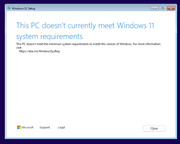
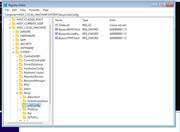
Re: How can Win11 be installed on VM \ TOS 6
Posted: 22 Feb 2025, 08:11
by JonRando
Any guidance from TM on this? Am I missing something obvious or this a legit issue?
I first reported this issue last fall.
Re: How can Win11 be installed on VM \ TOS 6
Posted: 22 Feb 2025, 15:09
by GevinKe
Hello, please confirm whether the hardware configuration assigned meets the minimum requirements for Windows 11, specifically at least 4GB of RAM, a 2-core CPU, and at least 64GB of storage. Alternatively, do you have any other ISO installation images available for testing, as different ISO images may contain specific installation configuration requirements.
Re: How can Win11 be installed on VM \ TOS 6
Posted: 24 Feb 2025, 01:31
by JonRando
I have the F8 SSD Plus
4 TB free space, 32 gig memory with 2% being used. I believe this mode is an eight core CPU model.
I have tried multiple Win11 images as well as custom images (RUFUS, etc) to bypass requirement checks with no luck.
No issues at all with Win10. Appears to be Win11 specific.
Re: How can Win11 be installed on VM \ TOS 6
Posted: 26 Feb 2025, 23:43
by JonRando
Do you guys have a lab where someone can test this on a similar spec'd machine?
I'm sure the default install RAM is sufficient to run a test to verify my claim or not.
Re: How can Win11 be installed on VM \ TOS 6
Posted: 27 Feb 2025, 15:47
by TMzethar
We have not observed the anomaly you mentioned on our laboratory equipment. We will continue to monitor the situation. Could you please inform us of the source of the images you are using?
Re: How can Win11 be installed on VM \ TOS 6
Posted: 27 Feb 2025, 18:06
by RyanYang
We downloaded and tried installing Windows 11 again.
You can visit the official Microsoft website to download the Windows 11 image and attempt the installation again.
During the installation process, please set the 4-core CPU according to step 4 below:
viewtopic.php?t=6180
It is important to note that different versions of Windows 11 have different hardware requirements, so make sure to choose the appropriate version of the system to meet the required hardware resources.
Re: How can Win11 be installed on VM \ TOS 6
Posted: 14 Mar 2025, 09:38
by JonRando
Hey Ryan,
Sorry to leave you hanging, but never saw the response on this until now. Saw the screenshots above and will follow up by mid next week.