Page 1 of 2
Folders created by Transmission are not available over the network
Posted: 18 Feb 2025, 02:24
by AES
Just like Surveillance, Transmission by default creates files that are readable for the main admin, and new files and folders created by applications are not accessible to other users.
I have previously addressed this issue regarding Surveillance and it was confirmed.
Probably the applications are launched by the main user and the folders created by the application have full access rights for him.
For other users, limited rights are issued that do not correspond to the settings of the parent folder and the rights set for this user.

Surveillance:
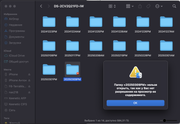
New folders with the name of the day, where Surveillance records are stored, created automatically, are created with the rights to deny access for the user from whom they are shared for MacBook. Although this user has rights to the root folder.
You have to set permissions for automatically created folders manually.
Re: Folders created by Transmission are not available over the network
Posted: 20 Feb 2025, 16:05
by TMzethar
Hi.
We have tried several times and have not reproduced the anomaly you mentioned.
Have you set up permissions for users to access the Surveillance folder and the Transmission download directory in advance?
Does the issue only occur when you share access with your MacBook?
Do you experience the same problem when accessing through File Manager on the TOS web page?
Re: Folders created by Transmission are not available over the network
Posted: 23 Feb 2025, 19:09
by AES
TMzethar wrote: ↑20 Feb 2025, 16:05
Hi.
We have tried several times and have not reproduced the anomaly you mentioned.
Have you set up permissions for users to access the Surveillance folder and the Transmission download directory in advance?
Does the issue only occur when you share access with your MacBook?
Do you experience the same problem when accessing through File Manager on the TOS web page?
Hello.
Everything is fine on Web TOS, everything is accessible, it opens from the main admin 'Anton'.
The problem is that after downloading the file, the user 'filesharing' is not given access rights, even to read.Screenshot of the file just downloaded Transmission.
Both users are administrators, both 'Anton' and 'filesharing'.
Transmission Version: 3.00 (bb6b5a062e), RPC: 16, WEB Control: 1.6.1 (20200913)

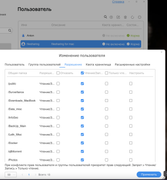
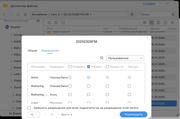
In the user profile 'filesharing', access to all folders is configured, including the one where I download this file. But in fact, these rights do not apply to new files created by the Transmission and Surveillance applications.

Re: Folders created by Transmission are not available over the network
Posted: 23 Feb 2025, 20:31
by TMnick
AES wrote: ↑23 Feb 2025, 19:09
You mean that even though permissions are set for the parent shared folder, files created by the application might not inherit these permissions from the parent folder, causing the permission settings to fail? For example, the video files generated by the Surveillance application in the Surveillance folder might not correctly inherit the permissions of the parent folder? We have previously verified that files generated by applications usually inherit the permissions of the parent shared folder. We will verify this issue again. If my understanding is incorrect, please correct me. Thank you!
Re: Folders created by Transmission are not available over the network
Posted: 23 Feb 2025, 23:34
by AES
TMnick wrote: ↑23 Feb 2025, 20:31
AES wrote: ↑23 Feb 2025, 19:09
You mean that even though permissions are set for the parent shared folder, files created by the application might not inherit these permissions from the parent folder, causing the permission settings to fail? For example, the video files generated by the Surveillance application in the Surveillance folder might not correctly inherit the permissions of the parent folder? We have previously verified that files generated by applications usually inherit the permissions of the parent shared folder. We will verify this issue again. If my understanding is incorrect, please correct me. Thank you!
everything is correct, the specified rights are not inherited by me.
Re: Folders created by Transmission are not available over the network
Posted: 25 Feb 2025, 10:17
by TMzethar
We have reproduced the issue in a specific usage scenario.
We apologize for the inconvenience.
We have begun an in-depth investigation and attempted to fix the issue.
Temporary solution: Re-create the user and give permissions to Transmission and Surveillance during the user creation process. This will allow the user to always have access to subfolders and downloaded files and resulting videos.
Re: Folders created by Transmission are not available over the network
Posted: 07 Mar 2025, 03:12
by AES
I downloaded a torrent from a torrent tracker, the folder is unavailable because the network drive and the download were from different users.
In other words, can I expect a solution to the problem in TOS 8?
Re: Folders created by Transmission are not available over the network
Posted: 07 Mar 2025, 14:43
by TMzethar
AES wrote: ↑07 Mar 2025, 03:12
I downloaded a torrent from a torrent tracker, the folder is unavailable because the network drive and the download were from different users.
In other words, can I expect a solution to the problem in TOS 8?
If possible, we would appreciate it if you could describe the process in detail. Screenshots would be even better.
Re: Folders created by Transmission are not available over the network
Posted: 10 Mar 2025, 02:31
by AES
I don't know what you don't understand.
If the file is created by an application from Admin-1, and you try to get access from another user (also an admin, Admin-2) over the network, then the other admin Admin-2 does not have access rights to the folder, although they should be, because he has explicit access to the root folder in the TOS settings in his profile.
This applies to both Transmission and Surveillance.
Re: Folders created by Transmission are not available over the network
Posted: 14 Mar 2025, 04:26
by AES
It seems that the problem with access rights has been resolved after the latest TOS update.