Page 1 of 1
F4 -210 I can't log in via the network
Posted: 13 Feb 2025, 22:01
by AlexPo
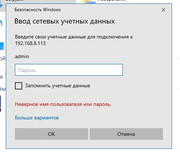
Hello! When I try to log in via file manager or via network, Windows 10 asks to enter network credentials. Are these Terramaster credentials or the computer's? How can I make NAS appear as a folder in the computer's file system?
Re: F4 -210 I can't log in via the network
Posted: 13 Feb 2025, 22:14
by ColaChen
Hello,These are the credentials of tnas. The user name and password of tnas are required.
Re: F4 -210 I can't log in via the network
Posted: 14 Feb 2025, 00:20
by Gremlin
You also need relevant services enabled on TNAS and the defined user must have permissions on related folders. Exact details may (?will?) vary depending on TOS version running on TNAS. {You may also need to ensure "Workgroup" name is set up in SMB file services and matched the Windows config.}
Re: F4 -210 I can't log in via the network
Posted: 14 Feb 2025, 02:40
by AlexPo
TMcola wrote: ↑13 Feb 2025, 22:14
Hello,These are the credentials of tnas. The user name and password of tnas are required.
I enter the data that I entered during initialization (admin, password), but they are recognized as incorrect. I returned to factory settings jf NAS, started initialization again, the result is the same.
Gremlin wrote: ↑14 Feb 2025, 00:20
Вам также необходимо включить соответствующие службы на TNAS, а определенный пользователь должен иметь разрешения на соответствующие папки. Точные данные могут (?будут?) отличаться в зависимости от версии TOS, работающей на TNAS. {Возможно, вам также потребуется убедиться, что имя "Workgroup" настроено в файловых службах SMB и соответствует конфигурации Windows.}
The admin has permissions, created a new workgroup on all two computers and specified it in the settings of NAS. This does not change anything.
I also gave permissions for access in the network settings.
I have been fiddling with the system for three days, the result is not pleasing yet.
Re: F4 -210 I can't log in via the network
Posted: 14 Feb 2025, 11:12
by TMzethar
This may be useful for you.
viewtopic.php?t=2759