Page 1 of 2
F8 Plus SSD & Unraid Problems
Posted: 11 Feb 2025, 17:22
by Hostile18
Hi. Recently bought a F8 Plus SSD Nas and tried all day yesterday to get Unraid to work smoothly.
Booting from USB seemed hit or miss, it might need to restart 2-4 times before it launched. Error messages seemed to change. Then once I was in it seemed unstable. Worked for hours then as soon as I started Docker and using apps I started to get hard crashes. By the time I was trying to get by data off, even with Dockers turned off it was crashing and resetting every 5-10 minutes.
Has anyone got Unraid working? I have a Pro Lifetime licence so keen to fix it if I can. I tried going back to TOS 6 (that I am unfamiliar with) and all seems to be working fine i.e no crashes or boot errors.
Re: F8 Plus SSD & Unraid Problems
Posted: 12 Feb 2025, 04:14
by Hostile18
Solution:
Security → Secure Boot → Secure Boot → Disabled
Boot → TOS Boot First → Disabled
VTd > Disabled.
Re: F8 Plus SSD & Unraid Problems
Posted: 12 Feb 2025, 06:31
by crisisacting
Hostile18 wrote: ↑12 Feb 2025, 04:14
Solution:
Security → Secure Boot → Secure Boot → Disabled
Boot → TOS Boot First → Disabled
VTd > Disabled.
unRAID doesn't currently support Secure Boot, so that would need to be disabled; disabling
TOS boot first & removing the internal USB initboot drive are necessary as well.
Disabling VT-d is going to hinder passing through any hardware (like the iGPU for hardware encoding) when running VMs in unRAID.
Re: F8 Plus SSD & Unraid Problems
Posted: 12 Feb 2025, 17:36
by Hostile18
crisisacting wrote: ↑12 Feb 2025, 06:31
Hostile18 wrote: ↑12 Feb 2025, 04:14
Solution:
Security → Secure Boot → Secure Boot → Disabled
Boot → TOS Boot First → Disabled
VTd > Disabled.
unRAID doesn't currently support Secure Boot, so that would need to be disabled; disabling
TOS boot first & removing the internal USB initboot drive are necessary as well.
Disabling VT-d is going to hinder passing through any hardware (like the iGPU for hardware encoding) when running VMs in unRAID.
Thank you, yeah the VT-d option it has to be off, with it on it there is massive instability on boot and during operation. Hopefully it's something one side can patch. I will need the iGPU for transcoding at some point.

Re: F8 Plus SSD & Unraid Problems
Posted: 15 Feb 2025, 05:46
by paltry031
I’ve been running unraid for about a month without issues, after applying the bios changes mentioned before.
You can still use the igpu for transcoding with vt-d off with docker containers. In your app docker container configuration, add a device with /dev/dri as the value.
Re: F8 Plus SSD & Unraid Problems
Posted: 19 Feb 2025, 19:43
by paltry031
After some digging, I found that to enable Intel iGPU hardware encoding on Unraid with the F8 SSD Plus, an additional configuration step is required.
1. Open terminal in Unraid :
Code: Select all
mkdir -p /boot/config/modprobe.d
echo "options i915 enable_fbc=1 enable_guc=3 disable_power_well=0" > /boot/config/modprobe.d/i915.conf
echo -e "\nmodprobe i915\nchmod -R 777 /dev/dri" | tee -a /boot/config/go
2. Reboot your Unraid system.
3. Ensure that the /dev/dri device mapping is correctly passed to your docker containers (e.g., Plex, Unmanic) and that you have Intel-GPU-TOP installed.
Before applying these changes, Plex hardware transcoding was visible in Plex, and Quick Sync video encoding "worked" in Unmanic, but were only using the CPU (verified via intel_gpu_top). After applying the fix, the iGPU rendering nodes are fully utilized.
source :
https://forums.unraid.net/topic/131548- ... -easy-way/
Re: F8 Plus SSD & Unraid Problems
Posted: 21 Feb 2025, 14:40
by XtinaLover
I'm running Unraid on this little powerhouse, and it's performing amazingly well. Just so you know, it also works with 48GB of DDR5! It's quick, quiet, and super reliable. I'm really enjoying it so far.
Re: F8 Plus SSD & Unraid Problems
Posted: 21 Feb 2025, 19:36
by paltry031
XtinaLover wrote: ↑21 Feb 2025, 14:40
it also works with 48GB of DDR5!
Lucky you! Which RAM module are you using?
I have a Corsair 48GB stick (CMSX48GX5M1A4800C40), but my F8 SSD Plus refuses to boot with it. I've seen mixed reports on compatibility. Aside from that, I'm happy with it too
Re: F8 Plus SSD & Unraid Problems
Posted: 22 Feb 2025, 15:39
by paltry031
Hostile18 wrote: ↑12 Feb 2025, 17:36
crisisacting wrote: ↑12 Feb 2025, 06:31
Hostile18 wrote: ↑12 Feb 2025, 04:14
Solution:
Security → Secure Boot → Secure Boot → Disabled
Boot → TOS Boot First → Disabled
VTd > Disabled.
unRAID doesn't currently support Secure Boot, so that would need to be disabled; disabling
TOS boot first & removing the internal USB initboot drive are necessary as well.
Disabling VT-d is going to hinder passing through any hardware (like the iGPU for hardware encoding) when running VMs in unRAID.
Thank you, yeah the VT-d option it has to be off, with it on it there is massive instability on boot and during operation. Hopefully it's something one side can patch. I will need the iGPU for transcoding at some point.
If you have 4 ssds or less, put them all on the cpu side of the motherboard, and vt-d should work just fine with unraid. That’s because the ssd slots on the RAM side of the motherboard are controlled by a pcie ASM2806 splitter chip which interferes with vt-d.
Tried it, works for me.
Re: F8 Plus SSD & Unraid Problems
Posted: 09 Apr 2025, 18:45
by epicwomble
Hi
I have one of these little beasts, so far running ok. I am having some issues with unmanic though, when it's doing transcoding to 264 to 265 it's incredibly slow. Like hours and hours for tv show, and days for movie. Before I was running on a F2 424 with a n95 cpu, that was much faster when using QSV or VaaP.
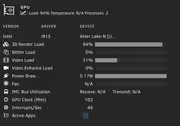
When looking at GPU top, the power draw and clock speed of the gpu seem incredibly low, yet the load is high.
any ideas?