Page 1 of 1
centralized backup 3.0.090 destination EMPTY
Posted: 11 Feb 2025, 17:15
by gexpo
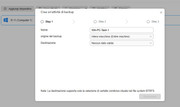
Hi, i'm using f2-221 TOS 5.1.67 - BTFRS Volume 2TB, and i cannot set DESTINATION FOLDER on it.
Where could be the problem?
Thanks for all.
Regards
GE

Re: centralized backup 3.0.090 destination EMPTY
Posted: 12 Feb 2025, 18:39
by gexpo
NO Volume 2 available: i got only Volume1, BTFRS (as shown in photo) with shared folders. Users data stored on it!
Re: centralized backup 3.0.090 destination EMPTY
Posted: 13 Feb 2025, 11:19
by TMzethar
Sorry for the previous incorrect response.
This may be an error in the interface for obtaining shared folders. Please try restarting Cenralized Bakcup to retrieve it again.
Re: centralized backup 3.0.090 destination EMPTY
Posted: 16 Feb 2025, 22:52
by gexpo
restarted NAS;
Restartyed Centralize Backup
same result.
thank you
Re: centralized backup 3.0.090 destination EMPTY
Posted: 17 Feb 2025, 10:40
by TMzethar
Based on the known information, the problem is likely to be related to both the system and Centralized Backup.
We observed that your NAS is a model from the TOS4 era, and its HDDs are probably still in the TOS4 storage format (system partition is only 2GB). It can barely use TOS 5.1.67, and you may encounter various issues.
While for stable usage, you can install TOS 5.0.176, which is more suitable for a 2GB system partition. However, Centralized Backup requires at least TOS 5.1.67.
If you do not have much data, we recommend that you back up your data, use the disk utility to delete all partitions on the HDDs, and then reinstall the latest TOS.
Re: centralized backup 3.0.090 destination EMPTY
Posted: 19 Feb 2025, 16:42
by TMzethar
According to the latest information, the Centralized Bakcup app has had several interface changes in following the TOS update. For stability and compatibility, it is recommended that you use TOS 5.1.145.