D4-320 and disk connectivity in Ubuntu
Posted: 07 Feb 2025, 03:28
OS: Ubuntu 24.04.1 LTS
Hardware: Beelink S12 Mini Pro, D4-320, one 4 TB IronWolf HDD, two 8 TB IronWolf HDD. All the drives are EXT4 format.
I'm having an issue with my HDDs and connectivity. I just formatted each one and created one partition on them since they're just NAS media storage for Plex. Immediately it's unrecognized. Sometimes root privileges take control over folders which leads me to my next point - the drives can be in use a lot.
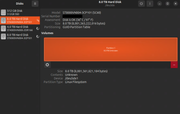
I spoke to support and upgraded the firmware on each slot. I've tried different USB ports on the computer and swapped drives around in the DAS. The other day I formatted the computer and reinstalled Ubuntu fresh - the issue followed me. One of my 8 TB drives just finished partitioning and this is what is being shown already (contents unknown, is not mounted):
Here is an example of an error I am constantly running into:
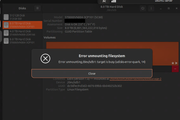
I also receive a variation of it ending in "0" instead of "14".
Result of lsusb:
Result of lsblk:
Hardware: Beelink S12 Mini Pro, D4-320, one 4 TB IronWolf HDD, two 8 TB IronWolf HDD. All the drives are EXT4 format.
I'm having an issue with my HDDs and connectivity. I just formatted each one and created one partition on them since they're just NAS media storage for Plex. Immediately it's unrecognized. Sometimes root privileges take control over folders which leads me to my next point - the drives can be in use a lot.
I spoke to support and upgraded the firmware on each slot. I've tried different USB ports on the computer and swapped drives around in the DAS. The other day I formatted the computer and reinstalled Ubuntu fresh - the issue followed me. One of my 8 TB drives just finished partitioning and this is what is being shown already (contents unknown, is not mounted):
Here is an example of an error I am constantly running into:
I also receive a variation of it ending in "0" instead of "14".
Result of lsusb:
Code: Select all
tom@ubuntu-server:~$ lsusb
Bus 001 Device 001: ID 1d6b:0002 Linux Foundation 2.0 root hub
Bus 001 Device 003: ID 8087:0026 Intel Corp. AX201 Bluetooth
Bus 001 Device 005: ID 0bda:5423 Realtek Semiconductor Corp. 4-Port USB 2.0 Hub
Bus 002 Device 001: ID 1d6b:0003 Linux Foundation 3.0 root hub
Bus 002 Device 007: ID 0bda:0423 Realtek Semiconductor Corp. 4-Port USB 3.0 Hub
Bus 002 Device 008: ID 174c:235c ASMedia Technology Inc. TDAS
Bus 002 Device 009: ID 174c:235c ASMedia Technology Inc. TDAS
Bus 002 Device 010: ID 174c:235c ASMedia Technology Inc. TDASCode: Select all
tom@ubuntu-server:~$ lsblk
NAME   MAJ:MIN RM   SIZE RO TYPE MOUNTPOINTS
loop0    7:0    0     4K  1 loop /snap/bare/5
loop1    7:1    0  74.3M  1 loop /snap/core22/1564
loop2    7:2    0  73.9M  1 loop /snap/core22/1748
loop3    7:3    0 269.8M  1 loop /snap/firefox/4793
loop4    7:4    0   258M  1 loop /snap/firefox/5701
loop5    7:5    0  10.7M  1 loop /snap/firmware-updater/127
loop6    7:6    0  11.1M  1 loop /snap/firmware-updater/147
loop7    7:7    0 505.1M  1 loop /snap/gnome-42-2204/176
loop8    7:8    0  91.7M  1 loop /snap/gtk-common-themes/1535
loop9    7:9    0  10.5M  1 loop /snap/snap-store/1173
loop10   7:10   0  10.8M  1 loop /snap/snap-store/1248
loop11   7:11   0  44.4M  1 loop /snap/snapd/23545
loop12   7:12   0  38.8M  1 loop /snap/snapd/21759
loop13   7:13   0   500K  1 loop /snap/snapd-desktop-integration/178
loop14   7:14   0   568K  1 loop /snap/snapd-desktop-integration/253
loop15   7:15   0   516M  1 loop /snap/gnome-42-2204/202
sda      8:0    0 476.9G  0 disk
├─sda1   8:1    0     1G  0 part /boot/efi
└─sda2   8:2    0 475.9G  0 part /
sde      8:64   0   7.3T  0 disk
└─sde1   8:65   0   7.3T  0 part
sdf      8:80   0   3.6T  0 disk
└─sdf1   8:81   0   3.6T  0 part
sdg      8:96   0   7.3T  0 disk
└─sdg1   8:97   0   7.3T  0 part