Page 1 of 1

F6-424 Max: Unable to Detect NAS (3 Beeps Issue on First Use)

Posted: 22 Jan 2025, 20:04
by spleenrun
Hi everyone,

I’m encountering an issue with my TerraMaster F6-424 Max, and I’m hoping someone can help. This is a brand-new NAS, and I’m trying to set it up for the first time. Here’s the situation:

When I power on the NAS, all the drive LEDs turn green.
I hear one beep at startup.
A few minutes later, I get 3 short beeps.
The TNAS software cannot detect the NAS.
Here is my configuration:

NAS model: TerraMaster F6-424 Max
HDDs: Toshiba 8TB N300 7200 RPM - x4
For the first launch, I had also installed:

SSDs: Crucial T500 1TB - x2
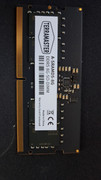
RAM: G.Skill RipJaws Series SO-DIMM 64GB (2 x 32GB)
When I experienced the issue, I reverted to the original configuration (HDDs only), but the problem persists, and I still hear the 3 short beeps.

when i'm shutdown the nas , i have also 3 shorts beeps

Does anyone know what might be causing this? Is it a hardware compatibility issue, or could it be something else?

Any guidance or troubleshooting steps would be greatly appreciated!

Thanks in advance!


Image

Image

Image

Re: F6-424 Max: Unable to Detect NAS (3 Beeps Issue on First Use)

Posted: 22 Jan 2025, 20:19
by Gremlin
Just off the top of my head, 3 beeps could be a ram issue.

Re: F6-424 Max: Unable to Detect NAS (3 Beeps Issue on First Use)

Posted: 22 Jan 2025, 20:27
by spleenrun
Gremlin wrote: 22 Jan 2025, 20:19 Just off the top of my head, 3 beeps could be a ram issue.
Thank you for your suggestion!

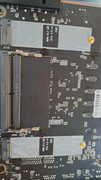
For the first power-on, I did use the G.Skill RipJaws Series SO-DIMM 64GB (2 x 32GB). However, since I encountered the issue, I’ve already reverted to the original RAM that came with the NAS. Unfortunately, the problem persists, and I’m still getting the same result with the 3 short beeps.

Thanks again for your help!
Image

Image

Re: F6-424 Max: Unable to Detect NAS (3 Beeps Issue on First Use)

Posted: 22 Jan 2025, 20:34
by HeliaWu
spleenrun wrote: 22 Jan 2025, 20:04
Hello, based on your description, the system initialization process appears to be correct and is currently in the phase of searching for an IP address for the TNAS. However, the TNAS PC has failed to locate the corresponding IP address. This issue may stem from the TNAS PC itself. We recommend that you try completely exiting the application and then reopening it to conduct another search.

Re: F6-424 Max: Unable to Detect NAS (3 Beeps Issue on First Use)

Posted: 22 Jan 2025, 20:38
by spleenrun
TMWut wrote: 22 Jan 2025, 20:34
spleenrun wrote: 22 Jan 2025, 20:04
Hello, based on your description, the system initialization process appears to be correct and is currently in the phase of searching for an IP address for the TNAS. However, the TNAS PC has failed to locate the corresponding IP address. This issue may stem from the TNAS PC itself. We recommend that you try completely exiting the application and then reopening it to conduct another search.
Thank you for your suggestion!

I’ve already tried restarting my PC multiple times and completely closing and reopening the TNAS application. I also ran TNAS as an administrator to ensure no permissions issues, but unfortunately, the NAS still isn’t being detected.

Do you have any other recommendations I could try?

Thanks again for your help!

Re: F6-424 Max: Unable to Detect NAS (3 Beeps Issue on First Use)

Posted: 22 Jan 2025, 20:47
by spleenrun
Thank you for your help!

I disabled the firewalls on my PC, and it seems to be working now. I’ll continue to monitor the situation to ensure everything is stable.

Thanks again for your support!

Re: F6-424 Max: Unable to Detect NAS (3 Beeps Issue on First Use)

Posted: 22 Jan 2025, 20:48
by HeliaWu
spleenrun wrote: 22 Jan 2025, 20:38
Hello,have you installed the TNAS Mobile application? Please ensure that both the TNAS device and TNAS Mobile are connected to the same network. Then, attempt to search again to see if you can locate the IP address.

Re: F6-424 Max: Unable to Detect NAS (3 Beeps Issue on First Use)

Posted: 22 Jan 2025, 20:55
by HeliaWu
TMWut wrote: 22 Jan 2025, 20:48
Hello, please first check whether the indicator light on the network interface is illuminated.