Problem with Docker and Pihole
Posted: 16 Jan 2025, 20:32
Hi, I've been “playing” with Docker on a F4-223 for a few days now. I have TOS6 updated to the latest version 6.0.610. I was curious and decided to give it a try, but I'm very lost in this world, so I decided to install PiHole.
I installed Docker Engine and Docker Manager, as well as Portainer (which comes out as recommended when you install Docker Engine) so far so great. From Docker Manager look in Image tab then Registry and search Pihole/Pihole, the image is downloaded and I'm ready to start it, I follow the steps and put it in host mode, although I have also tried in bridge mode but I mount the IP 172.17.0.1 Until as they say in the configuration of pihole in github I add the variables WEBPASSWORD and FTLCONF_LOCAL_IPV4 (here I put the IP that has the NAS).
The case that if I put it in bridge if I can enter the admin page but if I put for example 192.168.1.30 as the IP of the NAS, I put it in Windows as the main DNS, I do not see any activity that this working or blocking requests. On the other hand, if I set it to Host, when I want to access the pihole admin, I automatically get the TOS desktop...
Can anyone give me a hand to configure or start PiHole? I don't know where to look for more information
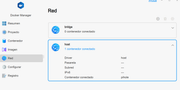
I have noticed that in Docker Manager in the Network section, in the host adapter, if I click on it, neither gateway nor subnet appears.
I installed Docker Engine and Docker Manager, as well as Portainer (which comes out as recommended when you install Docker Engine) so far so great. From Docker Manager look in Image tab then Registry and search Pihole/Pihole, the image is downloaded and I'm ready to start it, I follow the steps and put it in host mode, although I have also tried in bridge mode but I mount the IP 172.17.0.1 Until as they say in the configuration of pihole in github I add the variables WEBPASSWORD and FTLCONF_LOCAL_IPV4 (here I put the IP that has the NAS).
The case that if I put it in bridge if I can enter the admin page but if I put for example 192.168.1.30 as the IP of the NAS, I put it in Windows as the main DNS, I do not see any activity that this working or blocking requests. On the other hand, if I set it to Host, when I want to access the pihole admin, I automatically get the TOS desktop...
Can anyone give me a hand to configure or start PiHole? I don't know where to look for more information
I have noticed that in Docker Manager in the Network section, in the host adapter, if I click on it, neither gateway nor subnet appears.