Page 1 of 1
Remove recordings from a deleted camera
Posted: 06 Jan 2025, 16:07
by FNIK
I had to recreate the camera “GARAGE-UNTEN” because it had problems with recording and stopped recording after half a day. In the camera settings, I selected ONIV and then the reduced stream.
Now I have created the camera with RTSP protocol. Now it records continuously, but I cannot set the reduced stream in RTSP. The settings are grayed out and therefore not operable.
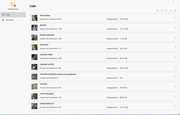
In any case, the recordings from the deleted camera are still in the recordings list and cannot be deleted.
How do I get the entry for the deleted camera "GARAGE-UNTEN(Die Kamera wurde gelöscht)" out of the list?
Re: Remove recordings from a deleted camera
Posted: 10 Jan 2025, 15:41
by FNIK
No one has any ideas? As I said, when I try to delete the camera's recordings from the list, nothing happens. The entry remains.
Re: Remove recordings from a deleted camera
Posted: 10 Jan 2025, 16:01
by TMnick
FNIK wrote: ↑06 Jan 2025, 16:07
I had to recreate the camera “GARAGE-UNTEN” because it had problems with recording and stopped recording after half a day. In the camera settings, I selected ONIV and then the reduced stream.
Now I have created the camera with RTSP protocol. Now it records continuously, but I cannot set the reduced stream in RTSP. The settings are grayed out and therefore not operable.
In any case, the recordings from the deleted camera are still in the recordings list and cannot be deleted.
How do I get the entry for the deleted camera "GARAGE-UNTEN(Die Kamera wurde gelöscht)" out of the list?
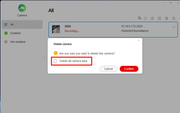
When you deleted the camera, did you check the option shown in the picture below? By checking it, deleting the camera will also remove the recorded videos. If you did not check it, you can also delete the videos on the recording page by selecting the ones you wish to delete.
Re: Remove recordings from a deleted camera
Posted: 17 Jan 2025, 20:14
by FNIK
I deleted the camera in the same way. However, the empty entries remained in the list under Recording. All data and recordings from the cam are deleted. How can I remove these entries?
Re: Remove recordings from a deleted camera
Posted: 18 Jan 2025, 15:35
by RyanYang
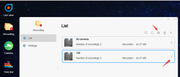
You can try to delete it by going to the list in "Recording".
Re: Remove recordings from a deleted camera
Posted: 20 Jan 2025, 00:24
by FNIK
Sorry, as i mentioned before i was deleting in the same way, you proposed. But in the end, the entry in the list is still there. The records are already deleted.
Re: Remove recordings from a deleted camera
Posted: 20 Jan 2025, 23:30
by TMnick
FNIK wrote: ↑20 Jan 2025, 00:24
Sorry, as i mentioned before i was deleting in the same way, you proposed. But in the end, the entry in the list is still there. The records are already deleted.
You can try deleting the camera that recorded the video, making sure to check the option to delete the recordings as well when removing the camera. Then, re-add the camera. Although this method may seem a bit clumsy, it could potentially solve your problem.
Re: Remove recordings from a deleted camera
Posted: 21 Jan 2025, 05:20
by FNIK
I'm sorry, the orphaned entry was created precisely as a result of this approach. Isn't there an index file in which the entry can be removed using the editor?
Re: Remove recordings from a deleted camera
Posted: 05 Aug 2025, 16:09
by FNIK
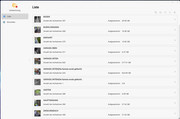
It is not possible to remove the records from a deleted camera. actually i have the still the old problem. After the last update one camera will not start recording. I was try to reactivate the camera and the surveillance manager too, more than 2 times. The records will be not deleted in the list.
with the current version i can not add the camera again. How can i delete the entrys in the list and how cann i add the camera again?
Re: Remove recordings from a deleted camera
Posted: 05 Aug 2025, 18:41
by TMzethar
FNIK wrote: ↑05 Aug 2025, 16:09
After the last update one camera will not start recording.
with the current version i can not add the camera again. How can i delete the entrys in the list and how cann i add the camera again?
Hi, are you referring to the latest v1.0.087 ?
If it is the latest version 1.0.087, please contact the official website's Live Chat window to schedule an engineer to remotely check it for you.