Page 1 of 1
System Info > Overview > CPU Temp & High Temp Alert - Incorrect?
Posted: 05 Jan 2025, 17:35
by CodeTheFuture
Hi All, i'm trying to understand where the GUI get's the Settings > System Info > Overview > CPU Temp from and if it's incorrect?
As we can see from the GUI the NAS is claiming the CPU is at 71-93degC and sometimes is alerting that it's temp is too high

Yet what we can see from SSH is that everything is OK?
Code: Select all
# sensors
nvme-pci-0400
Adapter: PCI adapter
Composite:    +40.9°C  (low  =  -0.1°C, high = +84.8°C)
                       (crit = +94.8°C)
Sensor 1:     +40.9°C  (low  = -273.1°C, high = +65261.8°C)
Sensor 2:     +43.9°C  (low  = -273.1°C, high = +65261.8°C)
Sensor 8:     +40.9°C  (low  = -273.1°C, high = +65261.8°C)

acpitz-acpi-0
Adapter: ACPI interface
temp1:        +27.8°C  (crit = +110.0°C)

nvme-pci-0500
Adapter: PCI adapter
Composite:    +46.9°C  (low  =  -0.1°C, high = +84.8°C)
                       (crit = +94.8°C)
Sensor 1:     +47.9°C  (low  = -273.1°C, high = +65261.8°C)
Sensor 2:     +47.9°C  (low  = -273.1°C, high = +65261.8°C)
Sensor 8:     +46.9°C  (low  = -273.1°C, high = +65261.8°C)
1. How exactly is the GUI collecting the CPU temp for display and monitoring? (What is the OS level command?)
F4-424 PRO running TOS v6.0.577-00166
Any help apreciated, thanks!

Re: System Info > Overview > CPU Temp - Incorrect?
Posted: 06 Jan 2025, 12:05
by CodeTheFuture
I found a command in this thread:
viewtopic.php?t=7001 thanks to the user "mab"
It's incorrect for the N305 NAS to alert at 95degC as this is the normal upper bound highpoint temp for the CPU to thermal throttle (lower its frequency to maintain a safe upperbound temp) and is by design, within specifications and can run at this temp its entire life!
For example maxing all cores+integrated GPU this is an expected temp. Anything OVER 95degC should be cause for concern because this would indiate that internal CPU throttling is not happening and may approach 105degC where the CPU would self-reset or halt to protect itself.
The Intel Specs for the N305 show that the CPU max temp is 105degC, why is TOS6 alerting high CPU at its TDP high point of 95degC?
How can I change CPU high temp alerting from the thermal throttle ceiling (normal of 95degC) to 100degC ?
I'm aware i can disable TNAS alerting on high CPU temp... i still want this feature! I just want the feature to alert at the correct temp!
https://www.intel.com/content/www/us/en ... tions.html
Package Specifications
Sockets Supported FCBGA1264
Max CPU Configuration1
TJUNCTION 105°C
Max Operating Temperature 105 °C
Code: Select all
~# while true;do echo $(date) $(ec_stat -rct) $(ec_stat -rst) $(ec_stat -rss) $( echo "AvgHz:"; grep MHz /proc/cpuinfo | awk '{print $4}' | awk '{temp+=$1;n++} END{printf("%f\n", temp/n);}');sleep 1;done

Mon Jan 6 14:20:37 AEST 2025 cpu_temputre = 95 system_temputre = 44 system_fanspeed = 1544 AvgHz: 2900.004875
Mon Jan 6 14:20:38 AEST 2025 cpu_temputre = 94 system_temputre = 44 system_fanspeed = 1541 AvgHz: 2799.997625
Mon Jan 6 14:20:40 AEST 2025 cpu_temputre = 95 system_temputre = 44 system_fanspeed = 1544 AvgHz: 2800.621500
Mon Jan 6 14:20:41 AEST 2025 cpu_temputre = 94 system_temputre = 44 system_fanspeed = 1544 AvgHz: 2799.224750
Mon Jan 6 14:20:42 AEST 2025 cpu_temputre = 94 system_temputre = 44 system_fanspeed = 1544 AvgHz: 2699.742625
Mon Jan 6 14:20:43 AEST 2025 cpu_temputre = 94 system_temputre = 44 system_fanspeed = 1544 AvgHz: 2799.508000
Mon Jan 6 14:20:44 AEST 2025 cpu_temputre = 95 system_temputre = 44 system_fanspeed = 1544 AvgHz: 2800.031375
Mon Jan 6 14:20:45 AEST 2025 cpu_temputre = 94 system_temputre = 44 system_fanspeed = 1544 AvgHz: 2799.973250
Mon Jan 6 14:20:46 AEST 2025 cpu_temputre = 94 system_temputre = 44 system_fanspeed = 1544 AvgHz: 2700.018625
Mon Jan 6 14:20:47 AEST 2025 cpu_temputre = 95 system_temputre = 44 system_fanspeed = 1541 AvgHz: 2599.996500
Mon Jan 6 14:20:48 AEST 2025 cpu_temputre = 95 system_temputre = 44 system_fanspeed = 1541 AvgHz: 2899.884375
Mon Jan 6 14:20:49 AEST 2025 cpu_temputre = 94 system_temputre = 44 system_fanspeed = 1541 AvgHz: 2999.826875
Mon Jan 6 14:20:50 AEST 2025 cpu_temputre = 94 system_temputre = 44 system_fanspeed = 1544 AvgHz: 2999.367250
Mon Jan 6 14:20:51 AEST 2025 cpu_temputre = 94 system_temputre = 44 system_fanspeed = 1541 AvgHz: 2999.936000
Mon Jan 6 14:20:52 AEST 2025 cpu_temputre = 93 system_temputre = 44 system_fanspeed = 1541 AvgHz: 2999.972000
Mon Jan 6 14:20:54 AEST 2025 cpu_temputre = 94 system_temputre = 44 system_fanspeed = 1541 AvgHz: 3033.884250
Mon Jan 6 14:20:55 AEST 2025 cpu_temputre = 94 system_temputre = 44 system_fanspeed = 1541 AvgHz: 2999.613625
Mon Jan 6 14:20:56 AEST 2025 cpu_temputre = 94 system_temputre = 44 system_fanspeed = 1541 AvgHz: 3000.091000


~# sensors

nvme-pci-0400
Adapter: PCI adapter
Composite:    +44.9°C  (low  =  -0.1°C, high = +84.8°C)
                       (crit = +94.8°C)
Sensor 1:     +44.9°C  (low  = -273.1°C, high = +65261.8°C)
Sensor 2:     +49.9°C  (low  = -273.1°C, high = +65261.8°C)
Sensor 8:     +44.9°C  (low  = -273.1°C, high = +65261.8°C)

acpitz-acpi-0
Adapter: ACPI interface
temp1:        +27.8°C  (crit = +110.0°C)

nvme-pci-0500
Adapter: PCI adapter
Composite:    +54.9°C  (low  =  -0.1°C, high = +84.8°C)
                       (crit = +94.8°C)
Sensor 1:     +54.9°C  (low  = -273.1°C, high = +65261.8°C)
Sensor 2:     +55.9°C  (low  = -273.1°C, high = +65261.8°C)
Sensor 8:     +54.9°C  (low  = -273.1°C, high = +65261.8°C)
Re: System Info > Overview > CPU Temp & High Temp Alert - Incorrect?
Posted: 07 Jan 2025, 00:54
by TMroy
According to our thermal design standards, even under full load, the maximum temperature of the CPU should not exceed 95°C. Once it approaches or exceeds this set threshold, a warning should be issued.
Re: System Info > Overview > CPU Temp & High Temp Alert - Incorrect?
Posted: 08 Jan 2025, 00:39
by Valnjes
Have you been replacing the Thermal Pad with a Thermal Grease?
That could be a problem!
If you have, then buy this Thermal Pad and apply it:
Honeywell Ptm7950 Thermal Pad
Your temperatures will never go above 55°C
Re: System Info > Overview > CPU Temp & High Temp Alert - Incorrect?
Posted: 08 Jan 2025, 19:44
by CodeTheFuture
You have both ignored what i've said. Please re-read what i've stated.
@TMroy how can this be your 'thermal design standards' when I have provided you the technical specification that state the CPU is designed to operate normally under load up to AND INCLUDING 95degC?
@Valnjes there is no need to replace thermal paste on a CPU operating normally.
A N305 at full load naturally will sit at 70-95degC. Spiking to 95degC is perfectly normal for a N305 under load. Currently TOS6 was designed in a way that indicate that the CPU thermal load was too high when the CPU spikes to 95degC. This is incorrect
TOS6 should understand that a N305 at 95degC is perfectly normal. I have provided links for you to confirm this. The temp level that TOS6 should warn at should be HIGHER then 95degC.
Re: System Info > Overview > CPU Temp & High Temp Alert - Incorrect?
Posted: 09 Jan 2025, 00:36
by Valnjes
I agree to disagree!
Replaced my goo with Ptm7950, and the loud out-take fan with a silent BeQuite fan, as an intake fan,
and under 100% load on all cores, max temperatures never hit 60°C.
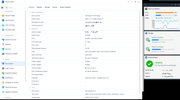
Most cores run at 3GHz in idle, and 2.1Ghz on full load.
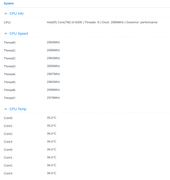
Can the CPU run at 95°C? Yes it can. Is it good? No it is not. Will it throttle? Yes, to 1.2Ghz.
So you are putting heat in your NAS, and loosing performance and lifetime of the MBO too.
And if i disable down-clocking, i can run it at 3GHz in CPU stress test, then i hit 74°C, but you will never have that scenario IRL, only synthetic stress test,
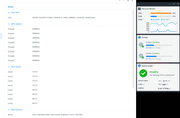
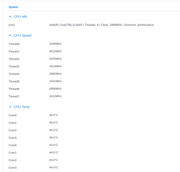
If i set to "nuke-it", it will turbo the best cores up-to 4.3-4.4GHz, but i dont recommend it for daily, just for benching your CPU, if you have to.
Re: System Info > Overview > CPU Temp & High Temp Alert - Incorrect?
Posted: 15 Jan 2025, 12:28
by CodeTheFuture
@valnjes Thanks for taking the time to provide such detailed response of your experience in this area!
I will certainly consider this. As you can imagine changing the thermal paste on a brand new device like this makes me nervous. For a few reasons 1) the device should come from manufacturer with sufficient thermal paste and 2) I wonder if it would void my warranty.
Did you find any articles or videos of the thermal paste changes on a F4-424 Pro (N305 CPU) NAS to follow yourself? Or did you just wing it?
Re: System Info > Overview > CPU Temp & High Temp Alert - Incorrect?
Posted: 18 Jan 2025, 15:32
by TMroy
Actually, you didn't understand what I said. I want to tell you that according to our design, the temperature of this model's CPU should not exceed 95 degrees!
Re: System Info > Overview > CPU Temp & High Temp Alert - Incorrect?
Posted: 21 Jan 2025, 03:58
by Valnjes
CodeTheFuture wrote: ↑15 Jan 2025, 12:28
@valnjes Thanks for taking the time to provide such detailed response of your experience in this area!
I will certainly consider this. As you can imagine changing the thermal paste on a brand new device like this makes me nervous. For a few reasons 1) the device should come from manufacturer with sufficient thermal paste and 2) I wonder if it would void my warranty.
Did you find any articles or videos of the thermal paste changes on a F4-424 Pro (N305 CPU) NAS to follow yourself? Or did you just wing it?
Im always DIY anything hardware based.
Dont remove the stock thermal compound, because it is excellent, and no paste will do better.
Only good thing to replace with is with Honeywell Ptm7950 Thermal Pad,
because there is a small gap between the heatsink and the CPU/iGPU core, and thats why it is a pad by design (good choice on TerraMaster HW engineers).
The second thing i made this weekend is a USB extender via flat-cable, so i can swap the boot USB and reflash it as i need it, without needing to disassembling all the NAS.