Page 1 of 1
Issue on camera preview (black screen) and default "Surveillance" folder
Posted: 04 Jan 2025, 02:22
by rvescovi
Hi,
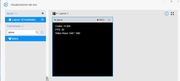
After successfully added the camera in TOS 6, it's not possible to show live because it appears a black screen despite the recorded file it's fine.
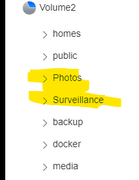
I noted another issue, NAS at boot continue to recreate the default root folder "Surveillance" despite I remove it and switched to a subfolder where the camera store files. (BTW Same behavior for TerraPhotos APP which recreates the default Photos folder at boot)
Thanks.
Re: Issue on camera preview (black screen) and default "Surveillance" folder
Posted: 04 Jan 2025, 15:14
by TMlinda
You can try editing the camera > selecting the image stream as the sub-stream.
Regarding the issue of creating a shared folder, currently a shared folder for an application is created by default when the application is started to store the video.
Re: Issue on camera preview (black screen) and default "Surveillance" folder
Posted: 05 Jan 2025, 01:17
by rvescovi
Thanks, the live preview cannot work with my old camera, I have no other choices to select a sub-stream due it has only one.
It always creates the default folder (/Volume2/Surveillance) despite my unique camera is configured to store in a subfolder of another shared one (/Volume2/media/..)
Anyway I deinstalled the app for now.
Re: Issue on camera preview (black screen) and default "Surveillance" folder
Posted: 03 Jun 2025, 20:25
by dataonly
Hi, I am have the same issues here with 3 Tapo camera, and Reolink video door bell, while recording is fine but live view is black for all of them. Changed from main stream to sub-stream did not fix the it.
Re: Issue on camera preview (black screen) and default "Surveillance" folder
Posted: 03 Jun 2025, 23:31
by TMzethar
You can contact the official website's Live Chat to schedule a remote resolution. Alternatively, you can wait for the new version to be released in a few weeks, which will include specific fixes for the black screen issue.
Re: Issue on camera preview (black screen) and default "Surveillance" folder
Posted: 13 Jun 2025, 13:39
by Herewerare2024
I have the same black screen issue. Reolink trackmix and a dlink camera both show black screen. No matter the configured stream and no matter if its onvif or straight rtsp. On previous software version the live stream video did work correctly so its a hurry up and wait for a new version situation.
Re: Issue on camera preview (black screen) and default "Surveillance" folder
Posted: 13 Jun 2025, 15:08
by OrionXie
We apologize for the poor experience you've had. We expect to fix this issue by the end of next month. If you're not in a hurry, you can wait for the update. If you need to use it urgently, please contact our technical support via email at
[email protected] or through the Official Live Chat, attaching this link and scheduling a remote meeting with us. Our engineers will assist you in troubleshooting and resolving the problem.