Page 1 of 2
Volume, Storage Pools and all kinds of other mess
Posted: 03 Jan 2025, 00:23
by Spider
Is anyone else equally as frustrated as i am with this OS?
Lets Start from the beginning.
I have 2 NAS
F4-220 and the F5221 Both running TOS version 5.1.145-00320
The F5-221 has the following:
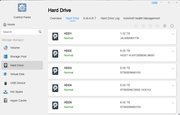
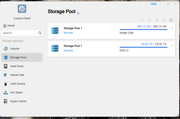
Why are there 2 storage pool 1?
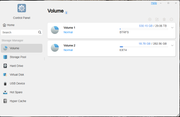
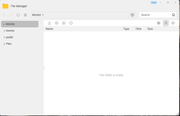
No Volume
All my files are on a volume that are nor showing in the file manager, but yet my plex server can still see the movies that I was able to add before this happened.
My F4-220 keeps losing connection and I would have to refresh to get to the desktop
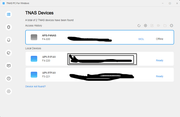
Can someone tell me what is going on here?
Re: Volume, Storage Pools and all kinds of other mess
Posted: 03 Jan 2025, 07:46
by Gremlin
I'll ask before anyone else, since I'm pretty sure @TMsupport will like to know - where do you see 2 x Storage Pool 1?
And, I think if you have a '/public' folder, you have a Volume. Typically /public is held on Volume1 by default. In reality
'/Volume1/public'
Re: Volume, Storage Pools and all kinds of other mess
Posted: 03 Jan 2025, 22:45
by Spider
I am sorry I thought I added that image.
You are right about /public being on Volume 1, but a folder that I had on there is not showing " Plex Movies.
Re: Volume, Storage Pools and all kinds of other mess
Posted: 03 Jan 2025, 22:54
by Gremlin
Now THAT is odd

I hope @TMsupport can figure it out.
Re: Volume, Storage Pools and all kinds of other mess
Posted: 03 Jan 2025, 23:38
by Spider
Yeah
I just now added the NAS to my domain and I can see my folder, but can not access it. Says I don't have permission. Tired to give permission and if fails.
Re: Volume, Storage Pools and all kinds of other mess
Posted: 03 Jan 2025, 23:41
by Spider
The only ones I can provide access to are the ones in the screenshot
Re: Volume, Storage Pools and all kinds of other mess
Posted: 04 Jan 2025, 14:59
by TMlinda
Did you put the hard drives of both devices together to boot? You can try restarting the devices.
Re: Volume, Storage Pools and all kinds of other mess
Posted: 05 Jan 2025, 03:31
by Spider
I have rebooted and rebooted. I have rebooted with the raid drive's in and out. I have gone into shared folder > advanced settings and did restore several time each with a reboot and nothing.
Re: Volume, Storage Pools and all kinds of other mess
Posted: 05 Jan 2025, 06:19
by Gremlin
I suspect I can guess what @TMwuu is suggesting.....Did you possibly mix up drives from the 2 devices? That might {might} give 2 Storage Pools of same designation, but I've never seen it and I don't know.
Re: Volume, Storage Pools and all kinds of other mess
Posted: 05 Jan 2025, 07:07
by Spider
No. No changes were made to the drives. The folder was there and now it's not. I was able to add files to it. Now I can't find it.