Page 1 of 3
Photos 3.0 Now is Released!
Posted: 31 Dec 2024, 17:45
by TMnick
Dear TerraMaster community,
Hello! Thank you for your continuous support and attention to the Photos app. We are thrilled to announce that Photos 3.0 is now officially launched!
Key Updates:
1.Optimized AI face recognition technology to enhance the speed and accuracy of face recognition.
2.Introduced AI scene recognition, automatically categorizing photos by scene type.
3.Refined the UI and user interaction for a more aesthetically pleasing, clear, and user-friendly experience.
4.Added a sorting function by creation time to cater to different scenarios.
5.Fixed several known issues.
Important Notes:
1.This new version is only compatible with TOS 6.0 systems. You need to upgrade your system to TOS 6.0.500 (X86) or a higher version.
2.Before starting to use Photos 3.0, please perform the "Rebuild Index" operation in the "Media Index" module of the TOS system. This will ensure that you can smoothly use all functions of the application.
3.If you have previously used the Photos app, after updating to the new version, please manually refresh your browser to ensure normal use.
4.Due to the introduction of a new AI engine technology, existing AI face recognition classifications will be cleared.
5.The first time you perform AI person or scene recognition, your TNAS device needs to connect to the Internet for a one-time authentication and activation of the AI recognition feature. Otherwise, the function will not be available for use.
6.The sorting function by creation time is available on TOS system versions 6.0.555 and above.
7.If the language display in the application is abnormal, you need to restart the NAS.
To enhance your product experience, your feedback and suggestions are welcome. Please share them under this topic.
Re: Photos 3.0 Now is Released!
Posted: 31 Dec 2024, 20:33
by mmedic
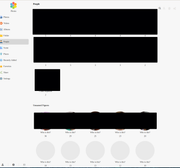
Hi! AI works great! Much more better than previous. But at least two issues for the new version coming from 2.*:
1) No multiple choice to delete recognized faces (delete button desaturates when selecting 2+ recognitions)
2) After some identified recognitions new ones (not identified) not visible in fully unfolded window browser windows but become visible when window is half of the screen (example attached). As it can be important, I am using chromium (with wayland composer).

Re: Photos 3.0 Now is Released!
Posted: 31 Dec 2024, 22:31
by TMnick
mmedic wrote: ↑31 Dec 2024, 20:33
Hi! AI works great! Much more better than previous. But at least two issues for the new version coming from 2.*:
1) No multiple choice to delete recognized faces (delete button desaturates when selecting 2+ recognitions)
2) After some identified recognitions new ones (not identified) not visible in fully unfolded window browser windows but become visible when window is half of the screen (example attached). As it can be important, I am using chromium (with wayland composer).
Thank you for your recognition, and we believe the future will be even better. Regarding the two issues you mentioned:
1) The need to delete multiple characters one by one is indeed an area for improvement, as it can be very time-consuming.
2) We haven't encountered this situation before. Can you see the content normally when you resize the window to a smaller size? We suspect that the thumbnail generation task might not have been completed, which is why you couldn't see it. When you resized the window, it might have coincided with the completion of the thumbnail generation task. This is just a guess and may not be accurate. You can provide more supplementary information, such as: How did this issue occur? Does refreshing the browser resolve the issue? Or what do you think might be the possible cause of this issue?
Re: Photos 3.0 Now is Released!
Posted: 31 Dec 2024, 23:07
by MrX
I have just updated Terra Photos, followed the instructions, now im getting the below, the menus dont look right, any help?
TOS: 6.0.577
F4-424

Re: Photos 3.0 Now is Released!
Posted: 31 Dec 2024, 23:57
by nale88
MrX wrote: ↑31 Dec 2024, 23:07
I have just updated Terra Photos, followed the instructions, now im getting the below, the menus dont look right, any help?
TOS: 6.0.577
F4-424
Please check above:
7.If the language display in the application is abnormal, you need to restart the NAS.
Btw, I uninstalled it (with full removal) and reinstalled, because I couldn't restart the device. It started working after reinstallation.
Re: Photos 3.0 Now is Released!
Posted: 01 Jan 2025, 00:03
by TMnick
MrX wrote: ↑31 Dec 2024, 23:07
I have just updated Terra Photos, followed the instructions, now im getting the below, the menus dont look right, any help?
TOS: 6.0.577
F4-424
You can try uninstalling the application and then reinstalling it to see if that resolves the issue. If not, you may need to restart the TNAS. This is likely caused by cached data in your browser from previous use. If the problem persists, please continue to contact me.
Re: Photos 3.0 Now is Released!
Posted: 01 Jan 2025, 00:05
by TMnick
nale88 wrote: ↑31 Dec 2024, 23:57
MrX wrote: ↑31 Dec 2024, 23:07
I have just updated Terra Photos, followed the instructions, now im getting the below, the menus dont look right, any help?
TOS: 6.0.577
F4-424
Please check above:
7.If the language display in the application is abnormal, you need to restart the NAS.
Btw, I uninstalled it (with full removal) and reinstalled, because I couldn't restart the device. It started working after reinstallation.
This is caused by browser caching, which we have also encountered in our testing. You can try uninstalling the application and then reinstalling it. Sometimes, a restart is also needed for the display to return to normal. This issue will not occur again in future updates.
Re: Photos 3.0 Now is Released!
Posted: 01 Jan 2025, 00:26
by MrX
TMnick wrote: ↑01 Jan 2025, 00:05
nale88 wrote: ↑31 Dec 2024, 23:57
MrX wrote: ↑31 Dec 2024, 23:07
I have just updated Terra Photos, followed the instructions, now im getting the below, the menus dont look right, any help?
TOS: 6.0.577
F4-424
Please check above:
7.If the language display in the application is abnormal, you need to restart the NAS.
Btw, I uninstalled it (with full removal) and reinstalled, because I couldn't restart the device. It started working after reinstallation.
This is caused by browser caching, which we have also encountered in our testing. You can try uninstalling the application and then reinstalling it. Sometimes, a restart is also needed for the display to return to normal. This issue will not occur again in future updates.
Thank you, restarting the nas seems to have resolved the issue for me.
Re: Photos 3.0 Now is Released!
Posted: 01 Jan 2025, 01:50
by mmedic
TMnick wrote: ↑31 Dec 2024, 22:31
mmedic wrote: ↑31 Dec 2024, 20:33
2) We haven't encountered this situation before. Can you see the content normally when you resize the window to a smaller size? We suspect that the thumbnail generation task might not have been completed, which is why you couldn't see it. When you resized the window, it might have coincided with the completion of the thumbnail generation task. This is just a guess and may not be accurate. You can provide more supplementary information, such as: How did this issue occur? Does refreshing the browser resolve the issue? Or what do you think might be the possible cause of this issue?
I noticed this accidentally while thinking that I had finished checking all identities and deleting unknown faces. By casually resizing the window, I discovered that new faces were appearing as unknown. Refreshing the browser did not resolve the issue, but any resizing that caused a change in the number of currently invisible unnamed figure columns led unidentified faces become visible. The same issue with FF browser. I am wondering if no one faced with the same issue till the moment. But browser window unfold (to full screen) is a key option to reconstruct the stop of unknown faces frame update.
Re: Photos 3.0 Now is Released!
Posted: 01 Jan 2025, 11:35
by TMnick
mmedic wrote: ↑01 Jan 2025, 01:50
TMnick wrote: ↑31 Dec 2024, 22:31
mmedic wrote: ↑31 Dec 2024, 20:33
2) We haven't encountered this situation before. Can you see the content normally when you resize the window to a smaller size? We suspect that the thumbnail generation task might not have been completed, which is why you couldn't see it. When you resized the window, it might have coincided with the completion of the thumbnail generation task. This is just a guess and may not be accurate. You can provide more supplementary information, such as: How did this issue occur? Does refreshing the browser resolve the issue? Or what do you think might be the possible cause of this issue?
I noticed this accidentally while thinking that I had finished checking all identities and deleting unknown faces. By casually resizing the window, I discovered that new faces were appearing as unknown. Refreshing the browser did not resolve the issue, but any resizing that caused a change in the number of currently invisible unnamed figure columns led unidentified faces become visible. The same issue with FF browser. I am wondering if no one faced with the same issue till the moment. But browser window unfold (to full screen) is a key option to reconstruct the stop of unknown faces frame update.
We have not encountered this problem in our experiments. We will conduct multiple trials in the future. If we can reproduce the issue, then we should be able to identify the cause.