[Copied]F4-424 Max installation guide for TrueNAS and Proxmox VE
Posted: 30 Dec 2024, 14:53
(Copied from TM forum_CN :https://forum.terra-master.com/cn/viewtopic.php?t=4690)
1. Use balenaEtcher or Rufus to burn the TrueNAS and Proxmox VE installation images onto two USB drives, which will serve as the boot installation media. A special note: do not use Ventoy to load the TrueNAS installation image.
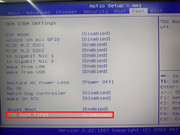
2. Turn on the NAS, and press the Del/Delete key to enter the BIOS setup. In the BIOS, first set "Fast > TOS Boot First" to Disabled.
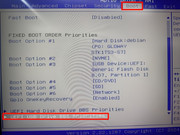
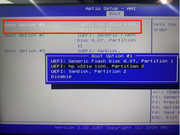
3. Set "Boot > UEFI USE Drive BBS Priorities > Boot Option #1" to the TrueNAS or Proxmox VE bootable USB drive you created.
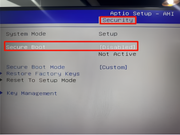
4. When installing TrueNAS, make sure to disable "Secure Boot" under the "Security" section. For installing Proxmox VE, this step is not necessary.
5. After these settings are configured, press F4 to save and exit the BIOS. Upon restarting the NAS, it will boot into the TrueNAS or Proxmox VE installation program. Follow the official installation guide for further instructions.
TrueNAS Official Installation Guide:
https://www.truenas.com/docs/scale/gett ... lingscale/
Proxmox VE Official Installation Guide:
https://pve.proxmox.com/wiki/Installation
1. Use balenaEtcher or Rufus to burn the TrueNAS and Proxmox VE installation images onto two USB drives, which will serve as the boot installation media. A special note: do not use Ventoy to load the TrueNAS installation image.
2. Turn on the NAS, and press the Del/Delete key to enter the BIOS setup. In the BIOS, first set "Fast > TOS Boot First" to Disabled.
3. Set "Boot > UEFI USE Drive BBS Priorities > Boot Option #1" to the TrueNAS or Proxmox VE bootable USB drive you created.
4. When installing TrueNAS, make sure to disable "Secure Boot" under the "Security" section. For installing Proxmox VE, this step is not necessary.
5. After these settings are configured, press F4 to save and exit the BIOS. Upon restarting the NAS, it will boot into the TrueNAS or Proxmox VE installation program. Follow the official installation guide for further instructions.
TrueNAS Official Installation Guide:
https://www.truenas.com/docs/scale/gett ... lingscale/
Proxmox VE Official Installation Guide:
https://pve.proxmox.com/wiki/Installation