How to grant access to all subfolders and contained files of a folder for a special user
Posted: 28 Dec 2024, 06:21
Hi,
I tried to update the access to subfolders and files that were copied with an admin to a TOS 6.0 NAS.
What I tried:
- right click on the main folder
- open preferences
- go to permissions
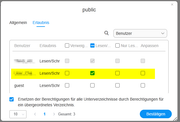
- set for the user the required access right (read or read/write) and set the checkbox for "replace access also for subfolders"
Result is, that I have to update every folder and sometimes also every file separately.
On a NAS with thousends of files this is not suitable.
Is there an easy way to set the access?
Many thanks.
BR casparius
I tried to update the access to subfolders and files that were copied with an admin to a TOS 6.0 NAS.
What I tried:
- right click on the main folder
- open preferences
- go to permissions
- set for the user the required access right (read or read/write) and set the checkbox for "replace access also for subfolders"
Result is, that I have to update every folder and sometimes also every file separately.
On a NAS with thousends of files this is not suitable.
Is there an easy way to set the access?
Many thanks.
BR casparius