attaching an eGPU to the F6-424 max
Posted: 15 Dec 2024, 22:11
Hi Terramaster Community,
I am planning to attach an external GPU to my Terramaster F6-424 max NAS to use it with Ollama and Large Language Models (LLMs). While the official specifications do not mention Thunderbolt, I noticed a reference to Thunderbolt capabilities and PCI tunneling over USB4 in the BIOS. This has led me to wonder if my NAS is actually Thunderbolt compatible.
Could you please confirm if the F6-424 max supports Thunderbolt? If so, would it be possible to use this feature to connect an external GPU and leverage its additional processing power for running LLMs on the NAS?
Thank you in advance for your assistance.
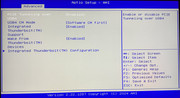
I am planning to attach an external GPU to my Terramaster F6-424 max NAS to use it with Ollama and Large Language Models (LLMs). While the official specifications do not mention Thunderbolt, I noticed a reference to Thunderbolt capabilities and PCI tunneling over USB4 in the BIOS. This has led me to wonder if my NAS is actually Thunderbolt compatible.
Could you please confirm if the F6-424 max supports Thunderbolt? If so, would it be possible to use this feature to connect an external GPU and leverage its additional processing power for running LLMs on the NAS?
Thank you in advance for your assistance.