Page 1 of 2
Resource Monitor Blank after Docker Update
Posted: 03 Dec 2024, 20:12
by fcs001fcs
Resource Monitor was working Ok (had some small issues with Network I/O) but after a TOS App update of Docker Engine to 27.2.1 and Docker Manager to 2.1.2 yesterday, the Resource Monitor graphs are all blank.
Rebooted the NAS a few times, but same issue.
I cleared the Resource Monitor data (clear reports) via the GUI, but still no graphs being displayed after some time.
I am on TOS 6.0.535.
TM: Can you kindly provide the CLI commands to restart the Resource Manager and possibly the permissions and file locations for the relevant files involved?
Re: Resource Monitor Blank after Docker Update
Posted: 03 Dec 2024, 21:44
by TMeric
Could you provide some screenshots to help us pinpoint the issue? We haven't encountered the situation you mentioned on our end.
Re: Resource Monitor Blank after Docker Update
Posted: 04 Dec 2024, 00:06
by fcs001fcs
When I disable (uncheck) "Enable continuous resource monitoring", I get some data points on the graph in real-time.
I checked the storage location listed in the "Resource monitoring" settings and that file "system.db" does not exist. The DB that is listed in that directory is "resource-monitor.db". I think this may be the problem.
I do not have the ability in the GUI to change the "Storage location" as it is greyed-out for me. See attached screenshot.
TM: How do I set the correct "Storage location" in the "Resource monitoring" settings?
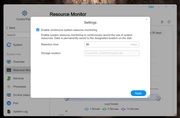
[/quote]
Re: Resource Monitor Blank after Docker Update
Posted: 04 Dec 2024, 11:33
by TMtina
fcs001fcs wrote: ↑04 Dec 2024, 00:06
When I disable (uncheck) "Enable continuous resource monitoring", I get some data points on the graph in real-time.
I checked the storage location listed in the "Resource monitoring" settings and that file "system.db" does not exist. The DB that is listed in that directory is "resource-monitor.db". I think this may be the problem.
I do not have the ability in the GUI to change the "Storage location" as it is greyed-out for me. See attached screenshot.
TM: How do I set the correct "Storage location" in the "Resource monitoring" settings?
We have verified your feedback and will fix it in subsequent versions. Additionally, the storage location for Resource Monitor does not currently support custom settings.
Re: Resource Monitor Blank after Docker Update
Posted: 04 Dec 2024, 19:08
by fcs001fcs
TMtina wrote: ↑04 Dec 2024, 11:33
We have verified your feedback and will fix it in subsequent versions.
Additionally, the storage location for Resource Monitor does not currently support custom settings.
I assume there is a configuration file that has this storage location set.
Can you provide the file name and path to that storage location for Resource Monitor configuration file so I can manually set it to the correct DB file?
Re: Resource Monitor Blank after Docker Update
Posted: 04 Dec 2024, 19:51
by TMtina
fcs001fcs wrote: ↑04 Dec 2024, 19:08
TMtina wrote: ↑04 Dec 2024, 11:33
We have verified your feedback and will fix it in subsequent versions.
Additionally, the storage location for Resource Monitor does not currently support custom settings.
I assume there is a configuration file that has this storage location set.
Can you provide the file name and path to that storage location for Resource Monitor configuration file so I can manually set it to the correct DB file?
We have resolved the issue of the Network I/O information not displaying in the Resource Monitor. Please stay tuned for subsequent TOS update notifications.
Re: Resource Monitor Blank after Docker Update
Posted: 05 Dec 2024, 21:08
by fcs001fcs
TMtina wrote: ↑04 Dec 2024, 19:51
We have resolved the issue of the Network I/O information not displaying in the Resource Monitor.
Please stay tuned for subsequent TOS update notifications.
@TMtina
I updated today to TOS 6.0.555 and this problem has not been corrected.
The problem is: Since the last TM Docker Apps update the Resource Monitor (ALL displayed graphs) will not display historical data at all, all the Graphs are blank. It will display real-time data, when the "Settings" check box is un-checked for "Enable continuous system resource monitoring", but that is not as useful as the historical data from the last 30 days, which now cannot be displayed.
When can we expect this issue to be corrected? Is it a TOS issue or did the Docker update break something and needs to be fixed in the Docker Apps?
Re: Resource Monitor Blank after Docker Update
Posted: 05 Dec 2024, 21:18
by EthanLiu
It can be confirmed that the issue you encountered was caused by the TOS system. The issue has been addressed, but according to our procedures, it will be further handled in subsequent versions. We apologize for any inconvenience caused to your use. Please continue to keep an eye on the subsequent updates and releases of TOS.
Re: Resource Monitor Blank after Docker Update
Posted: 05 Dec 2024, 22:18
by Gremlin
FYI:
I have latest docker/engine now running under 6.1.555 (today). Only issue I now notice is blank graph under 'All' network acvtivity for 'Yesterday'. (But there might not have been any data actually stored for 'yesterday'??)
Re: Resource Monitor Blank after Docker Update
Posted: 05 Dec 2024, 22:28
by fcs001fcs
Gremlin wrote: ↑05 Dec 2024, 22:18
FYI:
I have latest docker/engine now running under 6.1.555 (today). Only issue I now notice is blank graph under 'All' network acvtivity for 'Yesterday'. (But there might not have been any data actually stored for 'yesterday'??)
I had a similar issue on prior TOS versions. I think it was linked to me using Link Aggregation on my 2 LAN ports. TM is aware of this issue and is supposed to fix it soon. Not sure if .555 fixes it or not as I cannot see any historical data now for any of the graphs.
For me on .555 it is showing real-time data for the Network I/O graph for All, LAN 1 and LAN 2, so I guess that problem has been fixed.