Page 1 of 1
How disappointing
Posted: 09 Nov 2024, 11:27
by Poojinky
I moved over from Synology, and I'm regretting it now, in fact, I'm still using my highly functional slightly dated synology in conjunction with my new lump
I just came here to say the plex software appears to be very poorly considered or maybe just incompatible with TOS6 looking at the naming convention of the latest version, and if that is the case, it's misleading, I've been mislead assuming that the software there was cited as working/functional ... I spent a few quid on this NAS too
I dont have any technical details outside of plex won't scan the folders declared (could be permissions, could be application being trash, but what it isnt is clear, intuitive or verbose to share troubleshooting )
Plex gang, go have a holiday, come back and focus on getting those W's please - this currently is useless.
Re: How disappointing
Posted: 09 Nov 2024, 11:59
by TMpzhen
I'm very sorry for the inconvenience caused to you. Could you please describe in detail what problem you encountered?
Re: How disappointing
Posted: 10 Nov 2024, 10:31
by TMzethar
We would deeply appreciate it if you could describe more about the problem.
Based on the information available, we can only guess that you have not found a place to set plex permissions.
(Control Panel - Shared Folders - Edit - Permissions - Apply Users)
We will consider how we can make it easier for customers to find the location to set application permissions such as plex.
Re: How disappointing
Posted: 10 Nov 2024, 20:22
by bugacha
TMzethar wrote: ↑10 Nov 2024, 10:31
We would deeply appreciate it if you could describe more about the problem.
Based on the information available, we can only guess that you have not found a place to set plex permissions.
(Control Panel - Shared Folders - Edit - Permissions - Apply Users)
We will consider how we can make it easier for customers to find the location to set application permissions such as plex.
I can echo OP experience but I managed to solve it via SSH. I can explain what goes wrong:
I have 1 volume with videos and music folders. I have one user, which is my admin user.
I go and install Plex from App store.
It installs fine and I configure Libraries, and same result as OP, Plex doesnt have permissions.
I read online that there supposed to be Plex user created, but I don't see it in UI Users, I only see it in /etc/passed
What I did to solve this, I manually created a User Group media in UI and added Plex user via adduser plex media via SSH
I then granted RO permissions on folders to group media and only then Plex is able to see them
TOS 6 is better than 5, but still bad
My questions :
1. Why when I install Plex, user Plex is not visible in UI Users?
2. Why group Plex or video are not visible in User Groups ? (They are present in /etc/groups)
Re: How disappointing
Posted: 10 Nov 2024, 21:29
by Gremlin
I would expect that 'plex' is considered a (quasi) system user and is tagged in /etc/passwd as "nologin". Lets face it 'root' appears in password file but TOS does not acknowledge it's existence. May depend on the uid/gid allocated to them. I don't run plex so I can't check that specifically.
Re: How disappointing
Posted: 10 Nov 2024, 21:56
by bugacha
Gremlin wrote: ↑10 Nov 2024, 21:29
I would expect that 'plex' is considered a (quasi) system user and is tagged in /etc/passwd as "nologin". Lets face it 'root' appears in password file but TOS does not acknowledge it's existence. May depend on the uid/gid allocated to them. I don't run plex so I can't check that specifically.
That's fine, happy for it to stay quasi user but then there must be a way to configure permissions on folders for Plex to see.
You can't just give RO access to allusers group, that's silly
Re: How disappointing
Posted: 18 Nov 2024, 11:28
by Poojinky
Hey all, thanks for the discussion !

Here's how it gets to work
Step one:
grant the application permission after the install has taken place
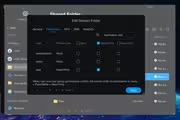 Step two:
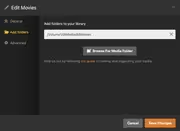
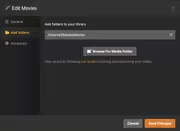
remove the @ characters from the folder path, where you will see /Volume1/@Media@/ it needs to be /Volume1/Media/ (if you see @ signs in the path, delete them
retrospect: it would be nice if we didnt have to do this from a UX perspective
Thanks
Re: How disappointing
Posted: 02 Dec 2024, 05:45
by Phyore
Poojinky wrote: ↑18 Nov 2024, 11:28
Hey all, thanks for the discussion !
Here's how it gets to work
Step one:
grant the application permission after the install has taken place
Step two:
remove the @ characters from the folder path, where you will see /Volume1/@Media@/ it needs to be /Volume1/Media/ (if you see @ signs in the path, delete them
retrospect: it would be nice if we didnt have to do this from a UX perspective
Thanks
Just checking, where is that "Application Users" dropdown? I only have groups and users and also having the issue of nothing showing
Re: How disappointing
Posted: 02 Dec 2024, 16:41
by IrisLi
Do you want to assign other users permission to use the application?
You can set this by going to Control Panel - Access Privileges - Applications.
Re: How disappointing
Posted: 02 Dec 2024, 16:45
by bugacha
bugacha wrote: ↑10 Nov 2024, 20:22
I can echo OP experience but I managed to solve it via SSH. I can explain what goes wrong:
I have 1 volume with videos and music folders. I have one user, which is my admin user.
I go and install Plex from App store.
It installs fine and I configure Libraries, and same result as OP, Plex doesnt have permissions.
I read online that there supposed to be Plex user created, but I don't see it in UI Users, I only see it in /etc/passed
What I did to solve this, I manually created a User Group media in UI and added Plex user via adduser plex media via SSH
I then granted RO permissions on folders to group media and only then Plex is able to see them
TOS 6 is better than 5, but still bad
My questions :
1. Why when I install Plex, user Plex is not visible in UI Users?
2. Why group Plex or video are not visible in User Groups ? (They are present in /etc/groups)
Actually cancel what I said above
I totally missed that when you set permissions from File Manager or Shared Folders there is a drop-down list to show Application Users and there there is a plex user.