Page 1 of 1
Rsync not working.
Posted: 28 Oct 2024, 19:23
by lgvlgv
Background: want to copy files on my terramaster to an usbdevice.
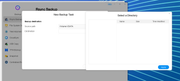
when i try to create a job i can point out the source but on destination i dont see anything not even the terramaster itself?
anybody knows why?
Nov i run rsync via shell insteed, working great so far.
Re: Rsync not working.
Posted: 28 Oct 2024, 19:26
by lgvlgv
Re: Rsync not working.
Posted: 28 Oct 2024, 19:35
by McCoder67
i'm by no means an expert, but wouldn't "USB Copy" be more suited for the job ? Unless the USB device is connected to another NAS ?
Re: Rsync not working.
Posted: 28 Oct 2024, 20:19
by ColaChen
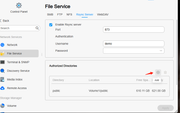
Hi,you need to add a folder on the rsync service startup page.Yes,i also suggest directly using USB copy.
![Image]()
Re: Rsync not working.
Posted: 28 Oct 2024, 22:06
by lgvlgv
McCoder67 wrote: ↑28 Oct 2024, 19:35
i'm by no means an expert, but wouldn't "USB Copy" be more suited for the job ? Unless the USB device is connected to another NAS ?
It dosent show USB at all?
"No mounted usb device"
When i reboot it showed it as 128MB or something, so run umont on it and mounted /dev/SBE (what ever it said) my usbdisk is a 16 TB disk
in shell its mounted and 16 TB, but dosent show in the app at all.
Re: Rsync not working.
Posted: 28 Oct 2024, 22:10
by lgvlgv
TMcola wrote: ↑28 Oct 2024, 20:19
Hi,you need to add a folder on the rsync service startup page.Yes,i also suggest directly using USB copy.
![Image]()
is there away to refresh the USBCopy service?
it says no USB device mounted, but its not true, i im copying for full true rsyn right now to the usbdisk.
Re: Rsync not working.
Posted: 28 Oct 2024, 22:15
by lgvlgv