Page 1 of 1
Can't create second storage pool on F4-424 Pro
Posted: 14 Oct 2024, 19:39
by McCoder67
I'm having trouble creating a second storage pool on my new F4-424 (running TOS 5.1.145-00320)
i have a 256GB SSD in slot one and have created a single disk storage pool on in
i have a 2TB SSD in slot two and am trying to create at single disk storage pool on that, but it fails every time

most of the time nothing happens when i click ok to the warning about having a heat sink on SSD , but twice i have gotten a message saying that it can't create a second storage pool until the first have finished synchronizing , which doesn't really make sense to me as store pool 1 is "single disk" and there is nothing to synchronize ??
Re: Can't create second storage pool on F4-424 Pro
Posted: 14 Oct 2024, 20:15
by McCoder67
hmmm, the system log show multiple Storage Pools having been created
but the web GUI shows only the first storage pool (on the 256GB SSD)
and when trying to create a new volume "existing storage pool" is grayed out.
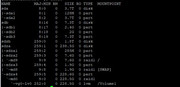
i attached the output from the lsblk command
Re: Can't create second storage pool on F4-424 Pro
Posted: 14 Oct 2024, 21:03
by TMlinda
You can try this operation: first, turn off the device, remove the hard drive that cannot be used to create the array, then restart the system, and finally insert the hard drive again to create the array.
Re: Can't create second storage pool on F4-424 Pro
Posted: 15 Oct 2024, 20:37
by McCoder67
TMwuu wrote: ↑14 Oct 2024, 21:03
You can try this operation: first, turn off the device, remove the hard drive that cannot be used to create the array, then restart the system, and finally insert the hard drive again to create the array.
it's a Nvme , so i would have to power down the NAS again after starting it up without the drive.
Right now i'm Rsyncing the first batch of data from my old Synology to the F4 , at 11MB/s it's going to take something 40 hours for the first 1.5TB, before i can power down the F4 again
Re: Can't create second storage pool on F4-424 Pro
Posted: 15 Oct 2024, 23:59
by TMzethar
In addition to your 2T NVMe SSD, your 4T disk and 8T disk seem to be from other systems that may have partition structures that can't be easily formatted away. If you intend to format them off and use them for F4-424 Pro storage, you can try TOS>Control Panel>Disk>Disk>Check the target disk>Wipe Disk. and then try to create the storage pool again.
Re: Can't create second storage pool on F4-424 Pro
Posted: 16 Oct 2024, 01:35
by McCoder67
TMzethar wrote: ↑15 Oct 2024, 23:59
In addition to your 2T NVMe SSD, your 4T disk and 8T disk seem to be from other systems that may have partition structures that can't be easily formatted away. If you intend to format them off and use them for F4-424 Pro storage, you can try TOS>Control Panel>Disk>Disk>Check the target disk>Wipe Disk. and then try to create the storage pool again.
those disks are from two old NAS'es, the 4TB from a DIY Nas running windows, and the 8TB from my old Synology. For now they need to be copied to another disk , so the 8TB ( and it's mate still in the Synology ) can be in the F4 , and the 4TB (and it's mate) can be in the Synology .
The F4 will then be primary NAS with 2x8TB and 2x12TB , and the Synology will have the 2x4TB and will be turned on once a week and the most important files on the F4 will be RSync'ed to there
The challenge of all this , is to move files between the disks so i don't lose anything i the process, and manage with the least amount of drives

Re: Can't create second storage pool on F4-424 Pro
Posted: 16 Oct 2024, 13:32
by filmaddicted
TMwuu wrote: ↑14 Oct 2024, 21:03
You can try this operation: first, turn off the device, remove the hard drive that cannot be used to create the array, then restart the system, and finally insert the hard drive again to create the array.
I have this problem but with my F4-423, can i do the same? Sorry for the bad english
Re: Can't create second storage pool on F4-424 Pro
Posted: 17 Oct 2024, 00:00
by McCoder67
TMzethar wrote: ↑15 Oct 2024, 23:59
In addition to your 2T NVMe SSD, your 4T disk and 8T disk seem to be from other systems that may have partition structures that can't be easily formatted away. If you intend to format them off and use them for F4-424 Pro storage, you can try TOS>Control Panel>Disk>Disk>Check the target disk>Wipe Disk. and then try to create the storage pool again.
It wouldn't let me wipe the 2TB SSD
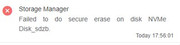
couldn't find anything in the TOS system log, and i'm not good enough with Linux to find anything in the Linux logs , sorry
Re: Can't create second storage pool on F4-424 Pro
Posted: 17 Oct 2024, 00:16
by McCoder67
did a wipefs -a on the 2TB Nvme and then did the TOS wipe , and it seemed to work
then i did a create storage pool and it seemed to go fine, but the storage pool never showed
i will try a more forceful attempt when i'm able to power off the NAS next time