TOS 6 - Shared Folders + user permissions prioritization still not correct
Posted: 09 Oct 2024, 10:02
Since I got my F2-424 a few months ago, I've been using TOS 6 exclusively, betas first and now v 6.0.507 - and this whole time, I've had an issue with User Permissions not overriding permissions given to a Shared Folder - so some users can't access the files & folders they need. As you'll see below, TOS 6.0.507 has bugs displaying assigned permissions but beyond that, regarding my goal, perhaps my expectations are unrealistic, perhaps it's the way TOS 6 privileges were designed to operate, or perhaps TOS 6 permissions are simply not currently working as its designers intended?
I'll simplify my setup and explain what I'm trying to achieve:
Shared Folder: (/Volume2/) "MY-TNAS"
Subfolders of "MY-TNAS" include: "/Videos", "/Music", "/Pictures", "/Documents/", and others
Users: User1, User2, User3, media, guest
Goal: I want to share ALL the folders of "MY-TNAS" with User1, User2, User3 but allow user media to ONLY have access to the MY-TNAS's /Videos, /Music, /Pictures subfolders, and at this time I do not wish to allow user guest to access anything (I may change that later).
What I did:
I'll simplify my setup and explain what I'm trying to achieve:
Shared Folder: (/Volume2/) "MY-TNAS"
Subfolders of "MY-TNAS" include: "/Videos", "/Music", "/Pictures", "/Documents/", and others
Users: User1, User2, User3, media, guest
Goal: I want to share ALL the folders of "MY-TNAS" with User1, User2, User3 but allow user media to ONLY have access to the MY-TNAS's /Videos, /Music, /Pictures subfolders, and at this time I do not wish to allow user guest to access anything (I may change that later).
What I did:
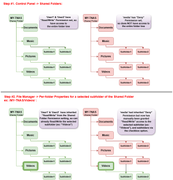
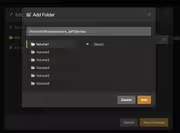
- In Control Panel->Shared Folders->selected MY-TNAS as a shared folder, EDIT, and on the General tab checked the box for 'Replace the permissions of all subdirectories with the permissions of the folder' (note: this option would be better located on the Permissions tab as it directly relates to it). On the Permissions tab, with 'User' selected in the dropdown, I've given Read/Write permission to User1, User2, User3 and set both user media and user guest to 'DENY'. With 'User group' selected in the dropdown, I've given both 'admin' and 'allusers' Read/Write permission.
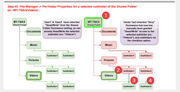
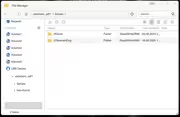
- In File Manager, I browsed to /Volume2/MY-TNAS/ then right-clicked it and selected 'Properties'. On the Permissions tab and with 'Users' selected in the dropdown, and with the 'Replace the permissions of all subdirectories..' checkbox checked, I made sure User1, User2, User3 each have Read/Write permission, and then set user media and user guest to 'Deny'. (*Bug*: on entry, the Permissions column said 'Deny' for users media & guest but the corresponding checkbox for each was not set; I manually set them just to be certain)[/b] With 'User Group' selected in the dropdown, I ensure both 'admin' and 'allusers' have Read/Write permission. Expected outcome at this point: Users 1-3 have Read/Write access to the MY-TNAS folder tree while users media & guest are denied access. Actual outcome at this point: as expected.
- In File Manager, I browsed to /Volume2/MY-TNAS/Videos then right-clicked it and selected 'Properties'. On the Permissions tab and with the 'Replace the permissions of all subdirectories..' checkbox checked, I made sure User1, User2, User3 AND user media each have Read/Write permission, and then set user guest to 'Deny'. Expected outcome at this point: Users 1-3 AND user media have Read/Write access to the /Videos subfolder tree while user guest is denied access. Actual outcome at this point: Users 1-3 have access to the /Videos subfolder tree while users media & guest are denied access.
- Test: Same as previous except attempt to set 'Read Only' for user media in order to see if that will take and to see how permissions are set further down the subfolder tree. *Bug*: on entry, the Permissions column says 'Deny' for user guest but the corresponding checkbox for guest is not set. Bug: on entry, the Permissions column says 'Deny' for user media but has a checkbox in the Read/Write column. Expected outcome: Users 1-3 have Read/Write access to the /Videos subfolder tree while user media has Read Only and user guest is denied access. Actual outcome: Users 1-3 have Read/Write access to the subfolder tree while users media & guest are denied access; [BUGs: Permissions column for user media says 'Deny' yet has no checkbox checked and for user media, says 'Deny' yet has 'Read Only' column checkbox checked
- Test: Inspect permissions of a subfolder of MYTNAS/Videos/, ie 'Movie1'. On entry, with 'Users' selected in the dropdown, the Permissions tab shows only 1 checked checkbox, for the Superuser (admin) - all others users' checkboxes are UNchecked despite the Permissions column showing set inherited permissions. The Permissions column says 'Deny' for users media & guest. Furthermore, with 'User Group' selected in the dropdown, despite both 'admin' and 'allusers' showing 'Read/Write' in the Permission column, all checkboxes on this screen are UNchecked.