Page 1 of 1
Synchronization started again right after it finished
Posted: 08 Oct 2024, 08:01
by plexjellyfin
Took about 3 days for an ew 20TB hard drive to be synchronized and as soon as it finished the process started again.
F6-424 Max
TOS 6.0.507
Bios 5.26
IronWolf NAS HDD 20TB x 3
I let the system run and did not touch it for the entire duration.
What happened?
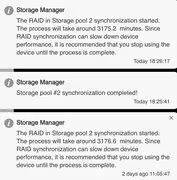
Re: Synchronization started again right after it finished
Posted: 16 Oct 2024, 13:37
by hellohuman
If the RAID array you're using detected an issue, such as a drive temporarily disconnecting, the system might start rebuilding the RAID to ensure data consistency. This can happen due to intermittent communication errors, faulty cables, or an unstable power supply.
it's just my personal opinion

Re: Synchronization started again right after it finished
Posted: 19 Oct 2024, 03:01
by Tallicia
I am having issues with a "RAID is Degraded" message and unable to see the temperature of the "missing" drive.
Am I to understand that there is no way to see the progress of a Raid synchronization process?
and that there is no way to see if any "detected issues" have occured that could trigger subsequent rebuilds or activities?
The frustration and unacceptable situation is that it's unclear what is going on.
These frustrations are with a new F6-424 on TOS 6.0.512-00137 and 2 20TB drives that I just received and am getting setup and configured. If this is going to be something with no clear indication or ability to see logs of synchronization progress, or "detected issues" I'm going to be quite displeased if not remedied to allow adequate transparency.
Waiting 3 days with a warning that my valuable data is jeopardy and it might go away is grossly insufficient.
My other F2-223 on TOS 5.1.67-00214 has been without issue, so with all the hype and marketing with TOS 6, I am doubly frustrated.
Re: Synchronization started again right after it finished
Posted: 19 Oct 2024, 15:38
by RyanYang
Hi, are you having trouble syncing but not syncing progress? Can you describe your usage and the process of running into problems?
If you use the process of "RAID is Degraded", you can go to the hard disk module of the control panel to check the identification of the hard disk, check whether the hard disk is inserted tightly, if the restart still encounters the same hard disk does not show, you can try to check the SMART value of the hard disk or replace the disk bit order and restart.