Page 1 of 1

Expanding storage after cloning disks

Posted: 27 Sep 2024, 06:24
by gohigher
So i have a f2-221 with 2 hard drives . Both are 2TB.
I've bought 2 new hard drives with both 8TB.
I've a hardware tool to clone my drives directly from the old to the new. Did this for both drives and everything works.

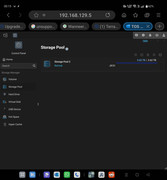
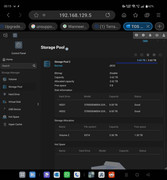
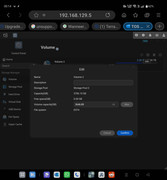
My only problem now is , how can i make use of the bigger hard drives? Because like you can see on the photos i've included , the volume size is still the size of the older hard drives.

Btw , using the max function does not work. It doesn't show the real free space

So now my question how can i fix this without loosing my data .

Image

Image

Image

Re: Expanding storage after cloning disks

Posted: 27 Sep 2024, 10:38
by ColaChen
Depending on your current situation, you can follow this link:viewtopic.php?f=79&t=2342

Re: Expanding storage after cloning disks

Posted: 27 Sep 2024, 16:17
by gohigher
TMcola wrote: 27 Sep 2024, 10:38 Depending on your current situation, you can follow this link:viewtopic.php?f=79&t=2342
If i'm using the command : mdadm --grow /dev/md0 --size=max , i get the error: mdadm: Cannot set device size in this type of array.
So now what?
Both hdd are configured in jbod.

Re: Expanding storage after cloning disks

Posted: 27 Sep 2024, 18:18
by ColaChen
Sorry, but after cloning from an old 2T partition to an 8T partition using the cloning tool, the disk will still be a 2T partition. Also, please note that your RAID type is JBOD and should not support expansion.
We recommend you to backup your data to another device, delete the partitions by Disk Utility, and then create a new 8T+8T JBOD storage pool.

Re: Expanding storage after cloning disks

Posted: 27 Sep 2024, 20:33
by gohigher
TMcola wrote: 27 Sep 2024, 18:18 Sorry, but after cloning from an old 2T partition to an 8T partition using the cloning tool, the disk will still be a 2T partition. Also, please note that your RAID type is JBOD and should not support expansion.
We recommend you to backup your data to another device, delete the partitions by Disk Utility, and then create a new 8T+8T JBOD storage pool.
So you can't expand your drive with the unallocated disk space ?
Will i loose all my installed apps on my nas to? Or is it just making a backup of the files and later on when i used the disk utility just copy them back?