Page 1 of 1

Remote Access

Posted: 25 Sep 2024, 04:16
by Badger3981
Hi i have a f2 423 that i intend to use for work purposes.
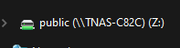
I have mounted the nas drive on my local computer to which the nas is attached.
I have the proceeded to make 8 other user accounts for staff and set the relevant folder permissions for them.

I would like to be able to mount the relevant folders for the staff on there computers which are at there homes on a different network to the nas.
They can access folders through the file manger by logging in on the TNAS windows app but no option to mount a drive.
I would like them to have SMB access to make copying and moving files around.

See attached image as what i want them to have
Image

Re: Remote Access

Posted: 25 Sep 2024, 09:53
by TMzethar
When you mention “different network”, do you mean different WAN IP networks or different network segments under the same WAN IP network?

If it is a different network under the same WAN IP network, you can access and map the share by typing \\LAN IP in Windows File explorer.

If it is a different WAN network, since SMB is not convenient for remote access, you can consider using tools such as RAIDrive/WinSCP/Filezilla to map the share via other protocols. (You need to set the port in the router).
You can also setup a VPN server so that when your staff members join the VPN, they can access TNAS via specific IP and map the shares.
viewtopic.php?t=2821
You can also refer to this to setup SMB for each of your staff members, but it is complicated.
viewtopic.php?t=5997

Re: Remote Access

Posted: 25 Sep 2024, 17:04
by Gremlin
Badger3981 wrote: 25 Sep 2024, 04:16
Take a look at "Tailscale" (or similar).

Re: Remote Access

Posted: 26 Sep 2024, 01:37
by crisisacting
Badger3981 wrote: 25 Sep 2024, 04:16
ZeroTier can do this & is fairly simple to setup.

Re: Remote Access

Posted: 26 Sep 2024, 02:13
by Badger3981
If i was to use Raidrive to setup via ftp service what would my ftp:// address be is there a easy way to find out?

Re: Remote Access

Posted: 26 Sep 2024, 04:26
by Badger3981
Is it just a case of enabling ftp in the control panel?
Then choosing a tool such as raidrive to map the shares?
Would i also need to setup a ddns to achieve this?

Completely new to this kind of working so sorry for the silly questions if they appear that way any help would be much appreciated.

Re: Remote Access

Posted: 26 Sep 2024, 13:58
by TMzethar
Regardless of which tool and which network file protocol you use, you will need to set up ports and DDNS (optional). These might help you understand more:
viewtopic.php?t=433