Page 1 of 1
How to add new HD to Raid 1 Storage Pool?
Posted: 22 Sep 2024, 21:19
by zax2000
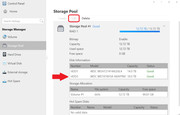
I have successfully synced my new HD to the Storage Pool and it now displays as being available, but the "Edit" option at he top of the Control Panel is now greyed out. How do I get the new disk space included in the Storage Pool?
NOTE: I do not want to create a Storage Pool that includes automatic backup of my data. I want to use all of my disk space in the server. I backup my important data on an external drive.
Re: How to add new HD to Raid 1 Storage Pool?
Posted: 23 Sep 2024, 03:04
by Gremlin
Looks to me as if you have 2 dissimilar hdd in raid 1 (mirror) config; in which case, you will not see additional storage space ( you have merely mirrored the smaller drive with the larger.
Re: How to add new HD to Raid 1 Storage Pool?
Posted: 23 Sep 2024, 10:31
by zax2000
I don't know what "mirror" config means. I just added a single drive when I first started using the server. The second drive is the same brand. One is just larger than the other. What is the point of having a server with multiple drive bays if you can't add additional drives to expand the usable space?
Re: How to add new HD to Raid 1 Storage Pool?
Posted: 23 Sep 2024, 17:15
by Gremlin
A raid 1 (mirror) is an arrangement where one drive carries an exact copy of the data on it's companion drive. It provides what is known as "redundancy" so that if one drive fails, the second will continue operating while the failed drive is replaced and re-incorporated into the raid 1 array. (A very short lesson an an often long and convoluted subject.)
Look at the top left of the image you posted below the highlighted edit button. You will have to figure out what you want to do. It will help if you advise what model hardware you have and which version of TOS in any future posts.
Re: How to add new HD to Raid 1 Storage Pool?
Posted: 24 Sep 2024, 14:24
by zax2000
I know what I want to do. I want to plug in a drive and have that drive added to my stack. How can I do this?
Re: How to add new HD to Raid 1 Storage Pool?
Posted: 24 Sep 2024, 18:20
by TMzethar
RAID1/RAID5 requires one disk to be used as redundancy.
After the RAID1 synchronization is complete, you can consider adding another disk to migrate to RAID5. This time the newly added disk will increase the overall capacity of the storage pool (+14TB).
Here's how to do it:
viewtopic.php?t=1544
Re: How to add new HD to Raid 1 Storage Pool?
Posted: 27 Dec 2024, 13:37
by zax2000
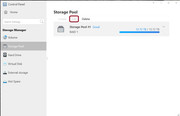
I have tried following the steps on that page. However, when I select the Storage Pool the "Edit " option is dimmed. I can only select "Delete." Is there a way for me to add the additional drive without deleting the storage pool and starting over?
Re: How to add new HD to Raid 1 Storage Pool?
Posted: 27 Dec 2024, 16:12
by Gremlin
You have to click on the storage pool to highlight it before you can edit. {Multiple pools are possible, so the system has to know which one is appropriate.}