Page 1 of 1
TOS 6 - Where is the COPY TO / MOVE TO option when multiple files/folders are selected?
Posted: 21 Sep 2024, 03:50
by SopraNo3
Hello,
There is no "MOVE TO / COPY TO" option when multiple files are selected. Why is that?


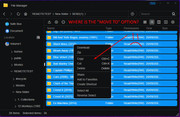
Re: TOS 6 - Where is the COPY TO / MOVE TO option when multiple files/folders are selected?
Posted: 21 Sep 2024, 16:21
by TMlinda
This option will be added in the next version.
Re: TOS 6 - Where is the COPY TO / MOVE TO option when multiple files/folders are selected?
Posted: 21 Sep 2024, 18:59
by Gremlin
I have relied on the good old 'cut & paste' for so long, I don't think I would have noticed.

Re: TOS 6 - Where is the COPY TO / MOVE TO option when multiple files/folders are selected?
Posted: 21 Sep 2024, 19:10
by SopraNo3
Yes that works too but with the previous TOS if you had done that then there was nowhere an indication that the task was being carried/executed.
At least now there is.
But, there is no information regarding the speed of the process or the time remaining.
If you want to see the speed, you need to open up the Resources Tab and check there which is not very convenient.
Re: TOS 6 - Where is the COPY TO / MOVE TO option when multiple files/folders are selected?
Posted: 30 Oct 2024, 17:29
by stainemotion
This depends on the type of file, folder, I don't think there is a fixed location.