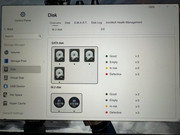
Raid 5 Problems - F4 424Pro - VERY STRANGE
Posted: 05 Sep 2024, 02:24
Raid 5 problems… I Will try to be brief… NEW Terra F4 424Pro..
August 9 2024 - Fresh install of up to TOS 6.0.436 Beta… NAS Operating OK…
NVME 1 - 1.02TB WDC PC SN530 SDBTPZ-100, serial xxxad461120
NVME 2 - 512GB KBG50ZNT512G LS KIOXIA, serial xxx1EWVU (used for cache)
And 4 x 18TB HDD Seagate IronWolf Pro
Slot 1 - Disk 1 – serial xxxPCQ
Slot 2 - Disk 2 – serial xxx3VB
Slot 3 - Disk 3 – serial xxxZMW
Slot 4 - Disk 4 – serial xxxZQS
Performed quick and long SMART tests on ALL drives.. all tested OK… Performed
IronWolf Health Management – ALL disks Healthy
August 26, 9am NAS reported Slot 3 - Disk 3 – Serial xxxZMW to be failed or degraded and detached. I turned off the NAS, took the drive off, put it back in, NAS continued to work OK
August 29, 1:11am NAS reported BOTH Slot 3 - Disk 3 – serial xxxZMW and Slot 4 - Disk 4 – serial xxxZQS as failed or detached AT THE SAME TIME (very very strange). I turned of the NAS as before, reattached the disks, NAS wouldn’t boot.
I took all the 4 disks out, installed Disk Genius as suggested by Terramaster in one of the support forums… Ran a complete Sector Scan of all the disks. All 4 disks tested OK, no bad blocks. This took a couple of days.
On September 2nd, thinking I lost all the data (I have backups), I re-inserted the disks in this order (swapped slots 1-2, 3-4 to 3-4, 1-2):
Slot 1 - Disk 3 – serial xxxZMW
Slot 2 - Disk 4 – serial xxxZQS
Slot 3 - Disk 1 – serial xxxPCQ
Slot 4 - Disk 2 – serial xxx3VB
After doing this, the NAS booted again, the Raid 5, previously inaccessible, reappeared with ALL the data. I then proceeded to update to TOS 6.0.461 and everything was working.
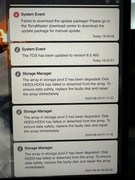
On September 4th (today), the NAS again reported at 2:01am that BOTH Slot 3 - Disk 1 – serial xxxPCQ
And Slot 4 - Disk 2 – serial xxx3VB as failed or detached AT THE SAME TIME, very strange AGAIN…
So this is where I am at today. I don’t think is the disks, as all 4 are new, tested all SMART tests OK, performed ALL blocks scan and reported no errors… I swapped the 4 disks and the problem persisted on Slots 3 and 4 with different disks. How can I proceed? Right now the NAS is turned on and responding. I don’t want to turn it off unless you need any additional info from it.
This is frustrating… Please help TERRAMASTER….
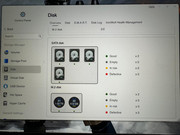
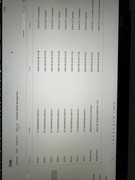
August 9 2024 - Fresh install of up to TOS 6.0.436 Beta… NAS Operating OK…
NVME 1 - 1.02TB WDC PC SN530 SDBTPZ-100, serial xxxad461120
NVME 2 - 512GB KBG50ZNT512G LS KIOXIA, serial xxx1EWVU (used for cache)
And 4 x 18TB HDD Seagate IronWolf Pro
Slot 1 - Disk 1 – serial xxxPCQ
Slot 2 - Disk 2 – serial xxx3VB
Slot 3 - Disk 3 – serial xxxZMW
Slot 4 - Disk 4 – serial xxxZQS
Performed quick and long SMART tests on ALL drives.. all tested OK… Performed
IronWolf Health Management – ALL disks Healthy
August 26, 9am NAS reported Slot 3 - Disk 3 – Serial xxxZMW to be failed or degraded and detached. I turned off the NAS, took the drive off, put it back in, NAS continued to work OK
August 29, 1:11am NAS reported BOTH Slot 3 - Disk 3 – serial xxxZMW and Slot 4 - Disk 4 – serial xxxZQS as failed or detached AT THE SAME TIME (very very strange). I turned of the NAS as before, reattached the disks, NAS wouldn’t boot.
I took all the 4 disks out, installed Disk Genius as suggested by Terramaster in one of the support forums… Ran a complete Sector Scan of all the disks. All 4 disks tested OK, no bad blocks. This took a couple of days.
On September 2nd, thinking I lost all the data (I have backups), I re-inserted the disks in this order (swapped slots 1-2, 3-4 to 3-4, 1-2):
Slot 1 - Disk 3 – serial xxxZMW
Slot 2 - Disk 4 – serial xxxZQS
Slot 3 - Disk 1 – serial xxxPCQ
Slot 4 - Disk 2 – serial xxx3VB
After doing this, the NAS booted again, the Raid 5, previously inaccessible, reappeared with ALL the data. I then proceeded to update to TOS 6.0.461 and everything was working.
On September 4th (today), the NAS again reported at 2:01am that BOTH Slot 3 - Disk 1 – serial xxxPCQ
And Slot 4 - Disk 2 – serial xxx3VB as failed or detached AT THE SAME TIME, very strange AGAIN…
So this is where I am at today. I don’t think is the disks, as all 4 are new, tested all SMART tests OK, performed ALL blocks scan and reported no errors… I swapped the 4 disks and the problem persisted on Slots 3 and 4 with different disks. How can I proceed? Right now the NAS is turned on and responding. I don’t want to turn it off unless you need any additional info from it.
This is frustrating… Please help TERRAMASTER….