Page 1 of 1
D5-300 Drives showing as 115.5PB in Ubuntu Server
Posted: 01 Sep 2024, 12:01
by pepper64
I'm trying to initialize RAID in my D5-300 in Ubuntu server 24.04.1 but I receive a Floating Point Exception when I try to run this command:
Code: Select all
sudo mdadm --create --verbose /dev/md0 --level=5 --raid-devices=3 /dev/sdb /dev/sdc /dev/sdd
For some reason the drives are showing up in lsblk and fdisk as being 115.5PB. See the images attached to this:

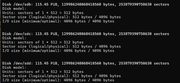
Is there something special I need to do to used this enclosure in Linux?
Re: D5-300 Drives showing as 115.5PB in Ubuntu Server
Posted: 01 Sep 2024, 20:39
by TMzethar
Please connect the D5-300 to Windows OS / macOS first, and set all the disks to Single mode through RAID Manager.
Then connect back to Linux.
Re: D5-300 Drives showing as 115.5PB in Ubuntu Server
Posted: 13 Nov 2024, 04:19
by yakireliyahu87
Hi,
I've encountered the same issue on my raspberry pi 5. When connecting more than one disk to D5-300, the OS identifies the disks as 115PiB.
I also noticed that the disk SN seems to be the controllers SN, so all disks are getting the same SN.
The product states that the TDAS is arriving in a SINGLE disk mode from the factory, so I'm not sure what there is to set on RAID manager.
I only have options to set a RAID array there.
When connecting each disk individually, it is recognized properly by the OS. Can it be a firmware issue?
Re: D5-300 Drives showing as 115.5PB in Ubuntu Server
Posted: 13 Nov 2024, 22:08
by TMzethar
You can create a RAID pool on Windows by using the D5-300's special utility RAID Mnanger, and then plug into Linux and format the RAID pool for use.
Note that it is not recommended to use the zfs method in creating storage pools, it may damage the hard disk partitions.
Re: D5-300 Drives showing as 115.5PB in Ubuntu Server
Posted: 19 Nov 2024, 02:43
by yakireliyahu87
I'm not sure what happened, but after a series of disconnecting and connecting the device to my raspberry pi, both drives are shown on the OS with their correct size.
I wish I knew what was the source of the problem, as I fear that I might run into it in the future.