Mounting another HDD (TOS6 Beta - 6.0.460 et al) - HOW?
Posted: 28 Aug 2024, 23:13
This relates to a discussion here: viewtopic.php?p=37649#p37649
So I have (re-)installed TOS6.0.460 on 2 Nvme drives. These are marked in control panel as 'system drives'
I have used a 3rd party app to create an Ext4 partition (no data) on a HDD. Inserted this drive to nas.
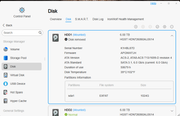
Checking the control panel 'Disk > Disk' I can see this drive. (Shows as 'Normal')
I can see a file system sda on this drive (expected)
if I 'lsblk' at cli I can see sda1 on sda listed as partition and disk respectively.
I cannot find a method within TOS GUI to actually mount this drive/partition to make it useful.
When selected in the GUI the 'mount' option remains greyed out.
The referenced discussion implies that this should be possible. Please advise.
So I have (re-)installed TOS6.0.460 on 2 Nvme drives. These are marked in control panel as 'system drives'
I have used a 3rd party app to create an Ext4 partition (no data) on a HDD. Inserted this drive to nas.
Checking the control panel 'Disk > Disk' I can see this drive. (Shows as 'Normal')
I can see a file system sda on this drive (expected)
if I 'lsblk' at cli I can see sda1 on sda listed as partition and disk respectively.
I cannot find a method within TOS GUI to actually mount this drive/partition to make it useful.
When selected in the GUI the 'mount' option remains greyed out.
The referenced discussion implies that this should be possible. Please advise.
 Does the drive to be mounted require data on it in order to be mounted
  REBOOT SYSTEM