Page 1 of 1
Can not add space to Storage Pools
Posted: 03 Aug 2024, 10:04
by GlitchedInGrey
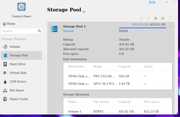
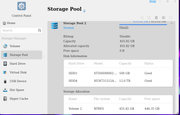
]i have 2 Storage Pools, one had a 500G NVME and the other a 500G HDD. I added a 2TB NVME to the NVME pool and a 12TB HDD to the HDD pool.
Each disk went through the synchronization and now show listed in each pool. I now do not have an option to use the added space within the pools. Both pools say about 450GB allocated and 0 space availble.
I added the 2 drives by selecting the "add hard drives to RAID" under the Storage Pool>Edit option
The Edit option is now greyed out and I can not select the option to expand.
How do I add the new space to the current pools?
Re: Can not add space to Storage Pools
Posted: 03 Aug 2024, 12:16
by TMLeeh
Hello, your storage pool currently uses the TRAID array type, which is actually equivalent to RAID1 when there are only two disks, providing redundancy for one disk. This means that the same data is stored on both disks to ensure data security. Therefore, the storage space available to you is limited to the capacity of a single hard drive. However, this configuration improves data security, and even if one of the hard drives fails, you can still recover all data from the other hard drive.
For more information about TRAID, please visit:
https://www.terra-master.com/global/terramaster-traid
If you want to expand your storage space while keeping your data safe, you can add more disks to your current storage pool. If you are looking for more storage space without redundancy, it is recommended to back up your data first, delete the existing storage pool, and create a Single or RAID0 array type.
Re: Can not add space to Storage Pools
Posted: 03 Aug 2024, 12:19
by GlitchedInGrey
Thanks for this. I guess this was a misunderstanding of how TRAID worked. I thought I could add to a 1 disk pool created with TRAID and would gain the new space. Being able to use different size drives with TRAID I thought was a plus.
Thank you though.
Re: Can not add space to Storage Pools
Posted: 03 Aug 2024, 20:53
by Gremlin
It can be a plus in multiple disk arrays, but with 2 disk arrays ...... well, you get what you get. When I last looked at the documentation I don't think it covered these downsides in much detail. Too much focussed on the multiple array with nice neat chunks of disk space.
