Page 1 of 1
Empty all bins - Volume page [Accepted]
Posted: 22 Jul 2024, 08:33
by koalakoala
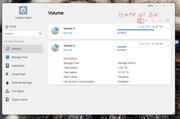
Hi, can you please add an "empty all recycle bins" button to the Volume page (@ control panel).
This will be usefull to identify the free space when moving and deleting large amount of files without going to each volume to empty the bins or without leaving the volume page. thanks
Re: Empty all bins - Volume page
Posted: 22 Jul 2024, 23:24
by TMroy
To empty the recycle bins, go to 'File manager', right click on Shared folder, and click 'Empty recycle bin'. You just need to do once for each Shared folder. Do you have many Shared folders?
Re: Empty all bins - Volume page
Posted: 23 Jul 2024, 05:01
by koalakoala
I know, I have like 80 shared folders, that was why I was asking for a single incon in the "Volume page"
What I found in the meantime is to create a task to empty the folders and run it when required... an icon would be more ellegant and functional for all users
Re: Empty all bins - Volume page
Posted: 24 Apr 2025, 01:38
by Yvee014
TMroy wrote: ↑22 Jul 2024, 23:24
To empty the recycle bins, go to 'File manager', right click on Shared folder, and click 'Empty recycle bin'. You just need to do once for each Shared folder. Do you have many Shared folders?
It does not work on my TOS 6 F2-424.
I also would like to get a more general "empty recycle bin" button for all the folders in a time
Re: Empty all bins - Volume page
Posted: 24 Apr 2025, 05:54
by Gremlin
Try Control Panel > Scheduled Tasks > Create and choose your option
Re: Empty all bins - Volume page
Posted: 26 Apr 2025, 10:05
by koalakoala
Gremlin wrote: ↑24 Apr 2025, 05:54
Try Control Panel > Scheduled Tasks > Create and choose your option
Thanks - Thats what I have now. But I was after a more efficient way (a simple icon - just one click, actioned when required)