Page 1 of 1
How to disable the 6 beeps on system alert notification
Posted: 01 Jul 2024, 08:34
by sigallai
I have a TNAS F5-221. I'm currently backing up my system to Backblaze. It's causing high CPU, which is fine, but whenever it reaches or goes over 90% the system will beep 6 times. This is only super annoying because it's in my bedroom and it keeps beeping throughout the night. The system doesn't constantly stay at or over 90%, just sporadically while the backups are running.
Is there any way to disable these 6 beeps on a system alert notification? I can't figure it out.
Re: How to disable the 6 beeps on system alert notification
Posted: 02 Jul 2024, 10:29
by TMzethar
We are unable to locate the problem you have described. Please provide as much information as you need.
TNAS model?
TOS version number?
App version number?
If possible, when the problem occurs again, please open the Control Panel - System Information and observe the temperature of the device, CPU and Disks. Then open Control Panel-Processes and sort by CPU and RAM to see the usage and take a screenshot.
Re: How to disable the 6 beeps on system alert notification
Posted: 03 Jul 2024, 07:11
by sigallai
Hi, thank you for the reply. It keeps happening sporadically. When the CPU spikes to 90% CPU usage it will beep 6 times. The CPU doesn't stay high that long, so it's hard to capture the process when it gets this high. I've provided screenshots you requested. Please check.
TNAS model: TNAS-F5221
TOS version number: 4.2.44-2101111540
App version number? I'm not sure what app you are referring to here
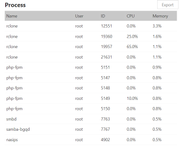
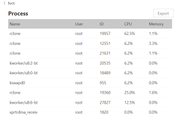
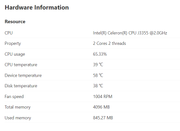
Re: How to disable the 6 beeps on system alert notification
Posted: 05 Jul 2024, 05:10
by sigallai
@TMzethar have you had a chance to review my screenshots? Do you have any suggestions how I can suppress the 6 beeps from the TNAS device or how I can modify the threshold which it activates the beeps?
Re: How to disable the 6 beeps on system alert notification
Posted: 05 Jul 2024, 17:08
by TMzethar
In general, for F5-221(TOS4), only switching on and off and missing RAID disk will beep. The phenomenon you mentioned has never happened.
You can turn off the notification in the user settings. Is there any difference between the sound and the tone of the beep when the TNAS is switched on and off? Please note if this is an unusual sound from the disk or other components?
Re: How to disable the 6 beeps on system alert notification
Posted: 06 Jul 2024, 01:32
by sigallai
I must have unlocked a new 'feature' then if you say it has never happened on a F5-221 device

.
It is definitely coming from the NAS itself. The raid is optimal, and all disks are showing optimal and green as well.
The beeps are I would say lower in tone. It's always 6 beeps. The beep on power on and off is a bit louder, that is only one beep. It always beeps once the CPU reaches 90%. I've tried to disable all notifications in two different places:
1. Control Panel -> General Settings -> Notifications
2. Notifications icon on main screen in top right corner -> Cog wheel
Both places only seem to stop email notifications and alerts within the NAS OS itself, but it still beeps.
This is driving me crazy.
I'm in the middle of a large backup and don't want to stop to test if the beeps go away.
There must be something on your end to tell you what 6 short beeps in a row mean... there has to be something??
Re: How to disable the 6 beeps on system alert notification
Posted: 06 Jul 2024, 09:15
by TMzethar
please generate and download the log report in TOS > Technical Support > Report Issues before you turn off TNAS, and then send it to our support mailbox for inspection.
This may record some relevant information
Re: How to disable the 6 beeps on system alert notification
Posted: 08 Jul 2024, 10:35
by sigallai
Thank you for your guidance. I've sent the report as suggested.