security consultant pop up
Posted: 15 Dec 2023, 19:31
hi all,
as i have set up remote ssh from a server to the tnas ie adding the servers pub key to the authorized_keys, i can remote ssh in now from the server to the nas via ssh username@tnas_ip but now when i web gui in the tnas i get floods of security consultant ssh pop ups all the time and i cant do anything on the tnas now (i attach image below)
https://i.postimg.cc/x86shpWP/tnas.png
can i maybe disable the notifications via ssh?
thanks,
rob
as i have set up remote ssh from a server to the tnas ie adding the servers pub key to the authorized_keys, i can remote ssh in now from the server to the nas via ssh username@tnas_ip but now when i web gui in the tnas i get floods of security consultant ssh pop ups all the time and i cant do anything on the tnas now (i attach image below)
https://i.postimg.cc/x86shpWP/tnas.png
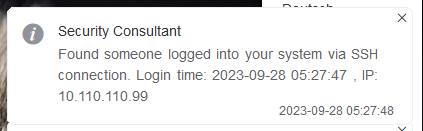
can i maybe disable the notifications via ssh?
thanks,
rob