Page 1 of 2
Storage Pool increased but storage allocation seems to fail
Posted: 03 Dec 2023, 18:31
by Epii
Hello everyone,
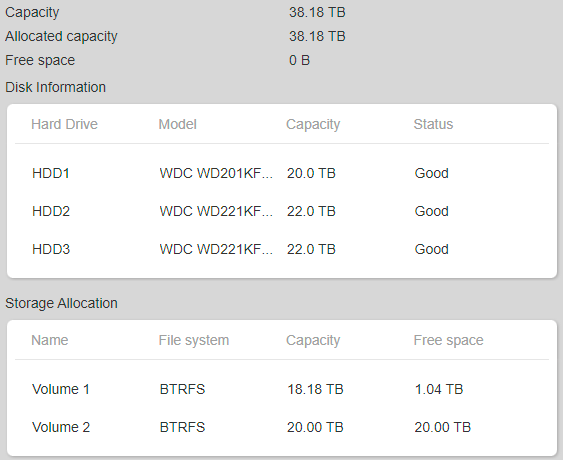
I have recently bought 2 new HDDS for my F5-221, the process to upgrade the storage pool seems to have work (even if it tooks almost 5 days) but I don't understand what is happening now.


I have no option and nothing to do so i don't really understand what is happening, I cannot create a Volume 3 nor click on the + icon.
Is there something I didn't do right ?
Thank you;
Re: Storage Pool increased but storage allocation seems to fail
Posted: 03 Dec 2023, 18:38
by Epii
Re: Storage Pool increased but storage allocation seems to fail
Posted: 03 Dec 2023, 19:49
by Gremlin
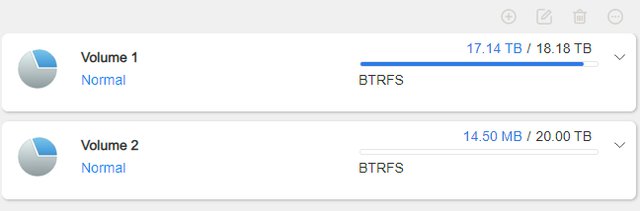
It looks like you have already used up your 38TB of storage pool in the two volumes you have created. (Voume 1 = 18TB and Volume 2 = 20TB (empty?).)
Therefore you cannot create another volume, unless you delete volume 2 and recreate two smaller volumes.
Re: Storage Pool increased but storage allocation seems to fail
Posted: 03 Dec 2023, 19:54
by tommi2day
supposed the 2 22TB WDs are the new drives the storage pool has been extended properly using TRAID(20-20+20 Raid5=20TB and 2+2 in Raid1=2TB). But as i understood you want to assign the new storage to volume1, but you created a new volume2 which occupies all new space. You may drop this volume2 after moving all data in it,Storage Pool 1 should show the unallocated space. Then go to Volume 1, press the right upper Pen(Edit) button and adjust the size of Volume1 there.
Re: Storage Pool increased but storage allocation seems to fail
Posted: 03 Dec 2023, 21:34
by Epii
tommi2day wrote: ↑03 Dec 2023, 19:54
supposed the 2 22TB WDs are the new drives the storage pool has been extended properly using TRAID(20-20+20 Raid5=20TB and 2+2 in Raid1=2TB). But as i understood you want to assign the new storage to volume1, but you created a new volume2 which occupies all new space. You may drop this volume2 after moving all data in it,Storage Pool 1 should show the unallocated space. Then go to Volume 1, press the right upper Pen(Edit) button and adjust the size of Volume1 there.
Alright, I have delete the Volume 2 and Indeed I can increase the Volume 1. But Still, my HDD3 is nowhere to found in the volume, so I guess something went wrong somewhere ?
Re: Storage Pool increased but storage allocation seems to fail
Posted: 03 Dec 2023, 21:57
by Gremlin
I think I see the problem. TRAID, like raid 5 - as Traid will effectively be - does not generate a storage pool equivalent to the sum of the drives included. You will (in this case) have 22TB (ie largest drive) allocated to parity and your pool capacity will be 42TB less an amount for overheads - ie 38TB. RAID 5 needs 3 equal size drives of which effectively 1 is parity. Traid simply allocates the largest drive. If you added another 22 TB drive you would see available capacity increase by the 22TB (approx), but with 3 drives it is what it is. [In reality the parity may be striped across the drives but the capacity is determined as above].
Re: Storage Pool increased but storage allocation seems to fail
Posted: 03 Dec 2023, 22:11
by Epii
Hummm I think I understand. But what can I do now ? I don't really want spare and I just one my Volume 1 to be 58 gb
Re: Storage Pool increased but storage allocation seems to fail
Posted: 03 Dec 2023, 22:45
by Gremlin
With TRAID you don't have a 'spare' (unless you specifically create one, of course) and the best capacity you can get from your situation is the 38TB. I presume that when you created your first storage pool you let the machine default to TRAID. If you didn't want Traid you should have changed it at that point. The only alternative now is to delete [WARNING...WARNING] your existing Traid storage pool and start again. BUT that means backing up all your data and then restoring to your new configuration.
Raid 0 might be an option ..... I have never done this, so check the details carefully elsewhere... and you will lose any redundancy. (ie if a drive fails, you WILL lose all your data.). If you can remove one of your drives from the existing traid (it would be degraded for a period of time) and then wipe the removed drive (using a desktop partition manager for example). Replace this drive in TNAS and create a Raid0 'array' on this drive. (such that you have 2 storage pools) and a new volume on this drive. Create new shared folders on the new volume. You may then be able to copy over all your data onto the new storage pool/Volume. If you have used /home folders these would also need to be copied across and that may well be an issue in itself. Once your copies are done, you could delete the Volume1 and Pool1. Remove and wipe the drives involved and then use them to expand your Raid0 array one at a time.
Again, these are just thoughts as to how you may proceed to achieve 58TB, but it is not something I would do because of the lack of redundancy. (Just had a less than year old drive fail!) Hopefully someone from @TMsupport will come along and correct anything I have got wrong.
Re: Storage Pool increased but storage allocation seems to fail
Posted: 05 Dec 2023, 15:39
by TMroy
I think your explanation is correct and helpful.
Re: Storage Pool increased but storage allocation seems to fail
Posted: 05 Dec 2023, 19:55
by Epii
I still don't understand, I cannot get more than 38 tb ? even with 2 * 22 and 1 * 20 ? That's so bad.
Currently my NAS is dead so I cannot test whatever you're asking, i'm waiting for the support to answer (and it's very slow

)