[TOS5]After updating the TOS5, there is an exception display of ".deCompressDir_..." and ".update..."?
Posted: 01 Nov 2023, 15:50
Applicable Models
All TNAS Models
Applicable Versions
TOS 5.0.x
Issue Description
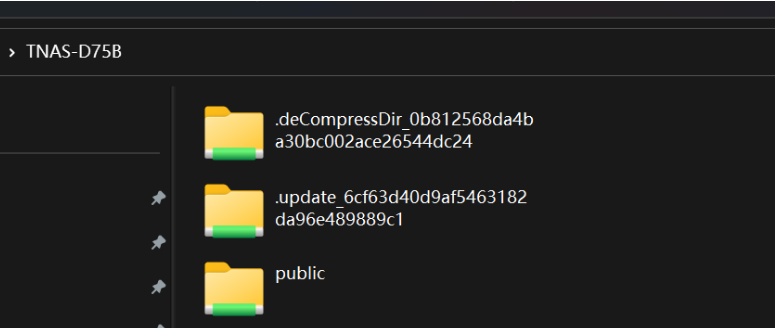
After upgrading TOS, when accessing your TNAS via SMB, two folders named .deCompressDir_0b812568da4ba30bc002ace26544dc24 and .update_6cf63d40d9af5463182da96e489889c1 are found. However, they cannot be seen in the TOS Shared Folders and File Manager.
Solution
1. Log in to TNAS WEB GUI, go to TOS Control Panel > General Settings, and click on "Scheduled Tasks". Click "Create" and choose "Customize." Enter the task name and click Next. In the "Custom command script" box, enter the following commands:
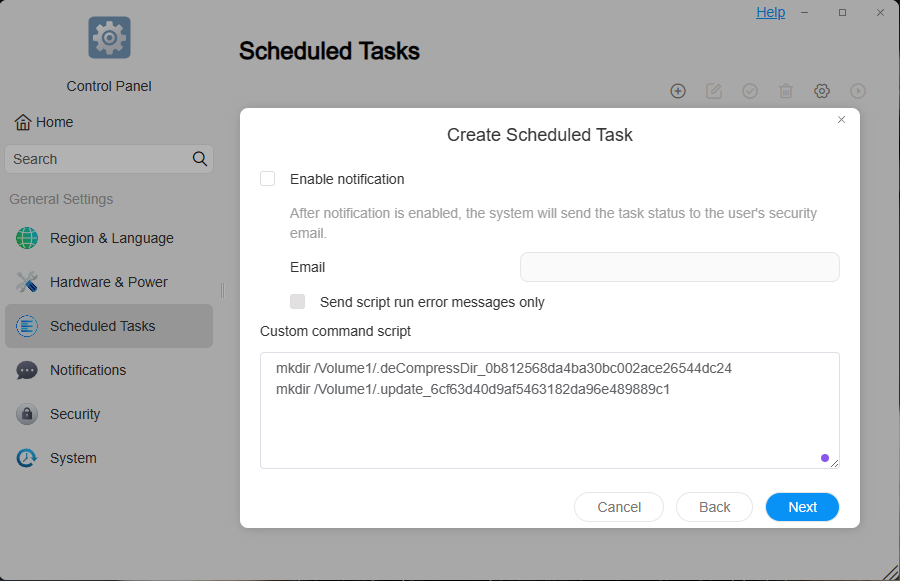
Click "Next", then click "Create" and "Execute" it.
2. In TOS Control Panel > Privileges > Shared Folder, locate the folders created in the "Scheduled Tasks", select on the shared folders and delete them.
3. After the folder deletion is complete, remove the created scheduled task.
All TNAS Models
Applicable Versions
TOS 5.0.x
Issue Description
After upgrading TOS, when accessing your TNAS via SMB, two folders named .deCompressDir_0b812568da4ba30bc002ace26544dc24 and .update_6cf63d40d9af5463182da96e489889c1 are found. However, they cannot be seen in the TOS Shared Folders and File Manager.
Solution
1. Log in to TNAS WEB GUI, go to TOS Control Panel > General Settings, and click on "Scheduled Tasks". Click "Create" and choose "Customize." Enter the task name and click Next. In the "Custom command script" box, enter the following commands:
Code: Select all
mkdir /Volume1/.deCompressDir_0b812568da4ba30bc002ace26544dc24
mkdir /Volume1/.update_6cf63d40d9af5463182da96e489889c1
Click "Next", then click "Create" and "Execute" it.
2. In TOS Control Panel > Privileges > Shared Folder, locate the folders created in the "Scheduled Tasks", select on the shared folders and delete them.
3. After the folder deletion is complete, remove the created scheduled task.