Page 1 of 4
TNAS mobile 3 ver.3.2.25 bug report
Posted: 14 Sep 2023, 20:10
by ostaporomo
Hello!
Yesterday I received an update to TNAS mobile 3 to version 3.2.25 from the Play Store.
An error has been found in the application.
You cannot change the backup path for photos and other files in the application. Whatever folder is pre-selected, the backup will still be in the default folder.
Re: TNAS mobile 3 ver.3.2.25 bug report
Posted: 14 Sep 2023, 20:30
by ColaChen
Hello!
Have you completed the previous backup task when you changed the backup destination?
Re: TNAS mobile 3 ver.3.2.25 bug report
Posted: 14 Sep 2023, 20:55
by ostaporomo
This was the first backup task that I launched, since the previous version of TNAS mobile 3 ver.3.2.24 crashed for me immediately after launch. Before this, I had not used TNAS mobile, since I recently received my F2-223 and D 4-300.
Re: TNAS mobile 3 ver.3.2.25 bug report
Posted: 15 Sep 2023, 09:24
by TMtina
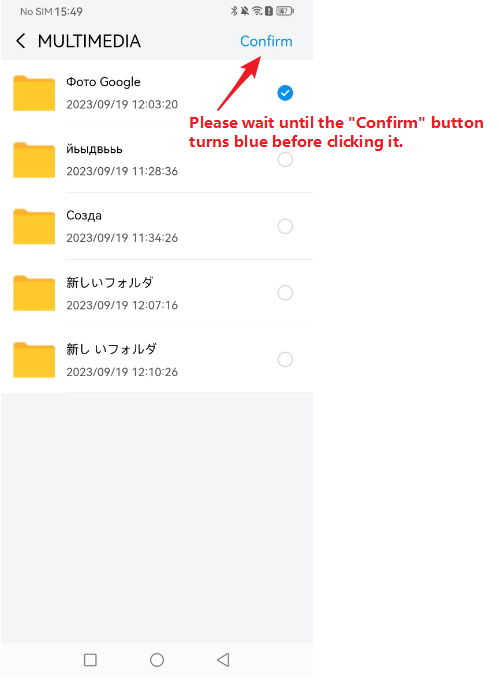
What is the brand and model of your mobile phone? Please reinstall the application. When you change the backup path, does the path name you choose contain special characters? Please wait until the confirmation button in the upper right corner turns blue before clicking it.
Re: TNAS mobile 3 ver.3.2.25 bug report
Posted: 15 Sep 2023, 12:29
by ostaporomo
My phone model is Google Pixel 7. I reinstalled the application, but this does not make sense, since I can see the folder that I would like to select for backups. The folder is located Home/Roman_Ostanin/MULTIMEDIA/ and is called " Фото Google". It has Cyrillic in its name - is that the problem?
Re: TNAS mobile 3 ver.3.2.25 bug report
Posted: 15 Sep 2023, 14:16
by TMtina
Can you provide a screen recording of the question?
Re: TNAS mobile 3 ver.3.2.25 bug report
Posted: 16 Sep 2023, 00:47
by ostaporomo
Screenshot_20230915-193021.jpg
The sequence of my actions
Re: TNAS mobile 3 ver.3.2.25 bug report
Posted: 18 Sep 2023, 10:35
by TMtina
After you select a folder, please wait until the confirmation button in the upper right corner turns blue before clicking it. Also, when you select a folder with a folder name similar to "abc", does it have the same problem?
Re: TNAS mobile 3 ver.3.2.25 bug report
Posted: 19 Sep 2023, 00:50
by ostaporomo
Thanks for the help!
I found out that the problem was that I used Cyrillic letters in the folder name. As soon as I created a new folder and named it in Latin letters, everything immediately began to work correctly. Problem solved!
You should indicate that folder names should be written in Latin characters.
Re: TNAS mobile 3 ver.3.2.25 bug report
Posted: 19 Sep 2023, 15:57
by TMtina
What is your TOS system version? When you select a folder, does the "Confirm" button in the upper right corner turn blue? Clicking only works when it turns blue. And make sure you have sufficient permissions on the selected folder.