Page 1 of 4
creating camera doesn't work
Posted: 02 Dec 2022, 05:21
by Rick
Recognizing a camera does not cause any problems, but at the last screen create camera nothing happens and the camera is not added. No error message. camera type is yubiX
Re: creating camera doesn't work
Posted: 01 Mar 2023, 02:37
by Abernathy
I installed the beta version of Surveillance Managager yesterday and have the same problem. At the 1st screen when I test the connection the camera display is shown but the last screen it just says "operation failed" which is not exactly helpful. I have a TP-link C200 and TOS 5 and F4-423. Has anyone got this camera and managed to get it working?
Re: creating camera doesn't work
Posted: 01 Mar 2023, 03:09
by crisisacting
Rick wrote: ↑02 Dec 2022, 05:21
Recognizing a camera does not cause any problems, but at the last screen create camera nothing happens and the camera is not added. No error message. camera type is yubiX
Maybe you need its RTSP port info; it should work as long as it's
ONVIF compliant, which is the minimum requirement of Terra-Master Surveillance Manager.
Abernathy wrote: ↑01 Mar 2023, 02:37
I installed the beta version of Surveillance Managager yesterday and have the same problem. At the 1st screen when I test the connection the camera display is shown but the last screen it just says "operation failed" which is not exactly helpful. I have a TP-link C200 and TOS 5 and F4-423. Has anyone got this camera and managed to get it working?
That camera is
ONVIF compliant, so it should work.
Follow
https://www.tp-link.com/uk/support/faq/2680/ to initially set it up on the camera side & you might need to point it @ port 2020, which is the default on these for ONVIF/RTSP.
Re: creating camera doesn't work
Posted: 01 Mar 2023, 17:25
by Rick
still same here
I got 5 onfiv cameras and none of them works (i got image on test connection) all cameras have onfiv port 8899 (also tested it on 80)
Operation failed or nothing happens.
Re: creating camera doesn't work
Posted: 01 Mar 2023, 18:06
by TMSupport
Please contact our tech team to have a remote check, you can find the contact information in my signature.
Re: creating camera doesn't work
Posted: 01 Mar 2023, 20:01
by freddye83
It's the same for me. 4 ONVIF cameras detected, I check with 80, 8899 and 554 port. nothing is good (connection echec).
My password do not content special character.
Re: creating camera doesn't work
Posted: 01 Mar 2023, 20:53
by powerQ
From my knowledge, this app has been removed, is it online again now?
Re: creating camera doesn't work
Posted: 01 Mar 2023, 22:02
by freddye83
powerQ wrote: ↑01 Mar 2023, 20:53
From my knowledge, this app has been removed, is it online again now?
Yes today beta V0.1.01
Re: creating camera doesn't work
Posted: 02 Mar 2023, 10:28
by TMnorah
What is the version number of the TOS system you are using? Are your cameras used by multiple platforms/browsers?
Please confirm whether all your cameras support the onvif protocol, and whether the protocol is enabled?
What exactly is the phenomenon that you cannot add? Are there any tips?
By the way, since the app is still in beta, there are still some places to optimize, meanwhile we will certify TNAS compatible cameras, please wait for our update.
Re: creating camera doesn't work
Posted: 03 Mar 2023, 17:57
by freddye83
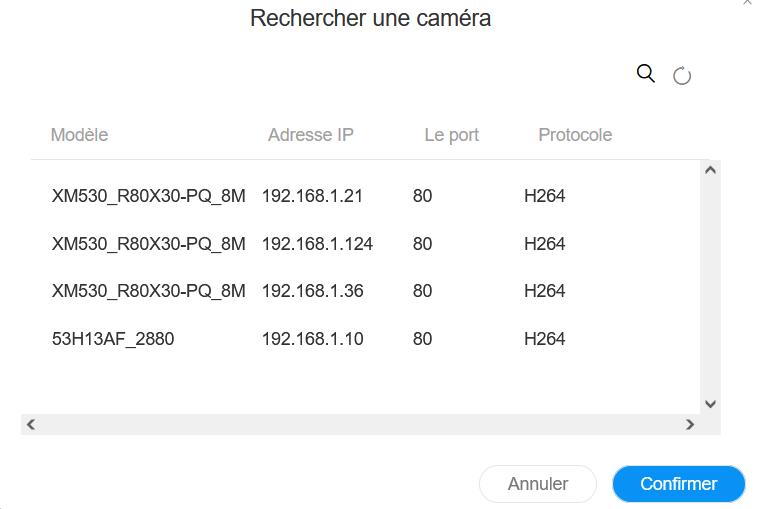
my camera is not in use.
I can add it on Motion, Synology surveillance and ONVIF DEVICE MANAGER.
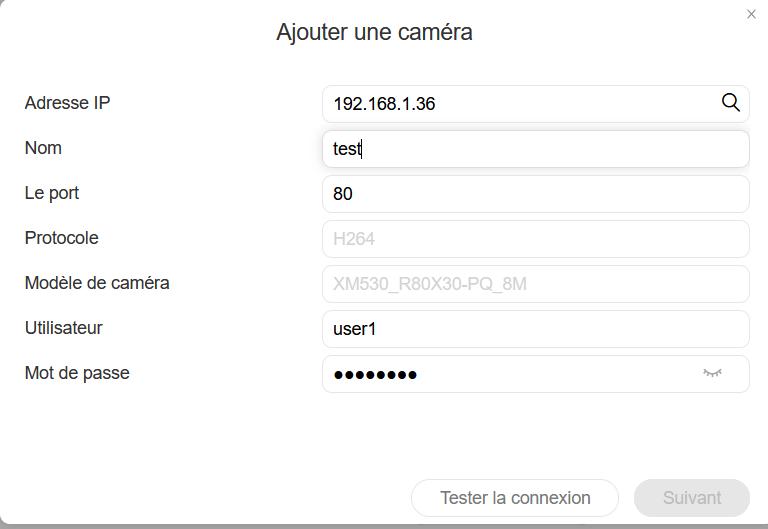
When i confirm information i have a massage "Echec de connexion à la caméra"