Page 1 of 1
USB hard drive not mounted
Posted: 07 Feb 2022, 01:10
by sound
Hello....
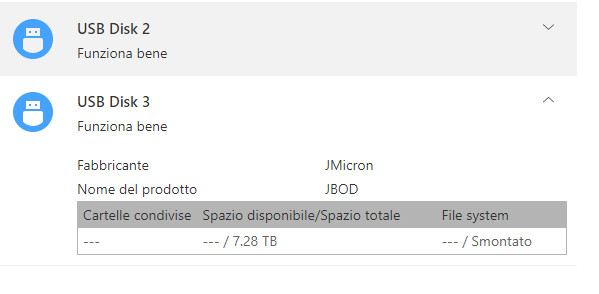
My F4-210 does not see an external USB hard drive.
As in the attached screenshot, it tells me it's unmounted.
("Smontato"="unmounted")
Connected to a PC it doesn't give me any problems.
Is there a possibility to mount it manually?
In the other USB connector I have another hard drive that can easily see it.
Thank you
Re: USB hard drive not mounted
Posted: 07 Feb 2022, 01:36
by titanrx8
I could be mistaken, but I believe I've seen that TOS will only mount 1 external USB drive at a time. Try unmounting the drive that's mounted and then attach the one that hasn't mounted.
Re: USB hard drive not mounted
Posted: 07 Feb 2022, 01:50
by sound
Hello titanox8 and thanks for the reply ......
but I have always had two USB HDs attached at the same time (the external ones are the backup of the NAS),
and they never gave me problems, I saw them both quietly ... I had disconnected them because I did a factory
reset of the NAS and now I wanted to copy from USB to NAS .....
If I connect the hard disk that is not mounted by the NAS to a PC, I see it and I see the files inside .....
so if there is no solution, I will copy the files via the PC.

Thank you....
Re: USB hard drive not mounted
Posted: 09 Feb 2022, 02:53
by sound
Re: USB hard drive not mounted
Posted: 09 Feb 2022, 17:04
by TMSupport
Hi! What is the USB file system? Please try swapping the locations of the two USB drives to see if they can be mounted normally.
Re: USB hard drive not mounted
Posted: 10 Feb 2022, 05:00
by sound
NTFS
I will try to swap the hard drives ....
Keep in mind, however, that before "leveling out" the NAS
I saw them both.
Ciao and thank you
Re: USB hard drive not mounted
Posted: 10 Feb 2022, 17:59
by TMSupport
Hi! It is not clear what caused it, you can back up the data first, format it and then remount it to the nas.

