Page 1 of 1
TerraMaster D2 not working
Posted: 10 Sep 2021, 21:34
by herrkaschke
Heya
i bought a D2 Tunderbolt to work with my Mac. Iam currently on my M1 Macbook Air with Big Sur 11.5.2 and the I7 Model also with 11.5.2
on none of them the neither the D2 or the new HDs are found which is a very disapointing first time performance of your Product.
I did everything like in the firsttime description. The D2 is on SINGLE as it comes, and i dont wanna change that. i tried premium WD Drives and Seagates. None of them is found. When i look into my Disk Utility nothing is shown. When i look into the Systeminformation into the Thunderbolt Tab then nothing is connected.
Is the hardware broken? I tried several drives and thunderbolt cables but nothing is working.
Re: TerraMaster D2 not working
Posted: 10 Sep 2021, 22:10
by TMroy
please try this solution
viewtopic.php?f=66&t=1106
Re: TerraMaster D2 not working
Posted: 10 Sep 2021, 22:39
by herrkaschke
nothing changes. did everything like in your description for a intel security chip. not the m1 one
I asked myself why I need to install a raid driver if I just needed the d2 working in two single drives?
drives not available or recognized nor enclosure
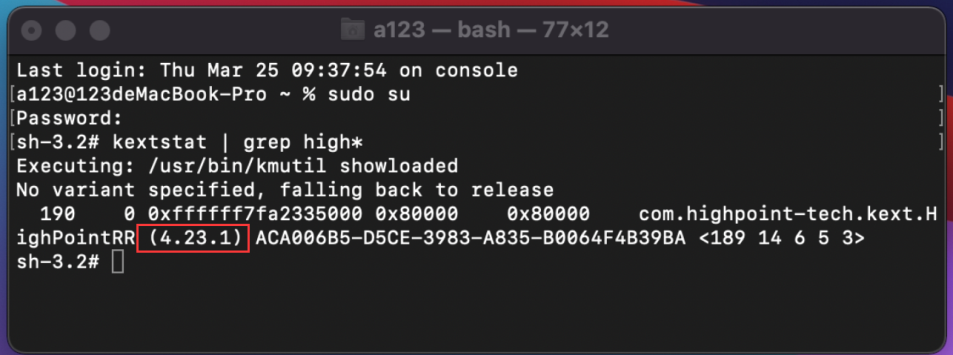
no version is shown after I entered everything I the terminal.
4.4 Input the command line kextstat | grep high* and press Enter.
did that
4.5 Please ensure that the version number is 4.23.1.
no version is show like in your previewpic. no driver is loaded
4.6 The RAID controller drive is installed successfully.
no he is not. its still the useless enclosure with three green lights doing nothing
also the description for this driver included no d2
Applicable Models
D4 Thunderbolt3, D5 Thunderbolt3, D8 Thunderbolt3, D16 Thunderbolt3.
Re: TerraMaster D2 not working
Posted: 10 Sep 2021, 22:53
by herrkaschke
let me state this clear. if you turn this not into function today I will return this immediately and buy a owc or anything else that will just work from start up. this is the most broken thing I bought ever
Re: TerraMaster D2 not working
Posted: 11 Sep 2021, 15:44
by TMroy
please try another troubleshooting here:
viewtopic.php?f=66&t=2414&p=13037#p13037
if you are sure the D2 device failure from the above troubleshooting, we will send you a replacement.
Re: TerraMaster D2 not working
Posted: 11 Sep 2021, 17:49
by herrkaschke
1. Make sure you are connecting the correct original power adaptor from TerraMaster;
yes everything is original and i used only the items, cables, screws and tools you send me within the package
2. Make sure you are connecting to the port on the device remarked as "PC"; Connecting to a wrong port may lead to connection failure;
yes did this
3. Install only one hard drive and power on the device;
4. Go to "About this Mac" > "System report" > "Hardware" > "Thunderbold/USB 4", if your TD2/D2 is functioning well, you will find a D2 device listed here; if you do not find the device, you may be using a wrong power adaptor or the D2 device is failed, please contact our service team for warranty service or a replacement;
5. Go to "About this Mac" > "System report" > "Hardware" > "USB", if your TD2/D2 is functioning well, you will find a Terramaster controller listed here too; if you do not find the Terramaster controller here, you may be using a wrong power adaptor or the D2 device is failed, please contact our service team for warranty service or a replacement;
i dont see any controllers or hardisk connectet to my m1 or i7. on two different Computers it doesnt work
6. If you do find the correct device listed on "step 4" & "step 5", your Mac does not recognize your drives, this means your hard drives may be failed, please replace your drives and try again. Note: one of your two hard drives fails may affect the normal show up of the other.
i tried wd black, wd red and seagate ironwolf. two different computers, your previous "solution" a thunderboltdriver which doesnt work for me and if i read your forum right for many other with the same same result: It doesnt work.
Your product is broken or failed as you call it. i dont need/want a replacement i just want to return this as fast as possible and get my money back to buy a reliable product which i can trust. i also opened a case at "Kaufland.de" where i bought this to receive a return note to get this back to you. iam really disappointed
Re: TerraMaster D2 not working
Posted: 11 Sep 2021, 18:31
by TMroy
I am sorry that you experiencing such an issue, there may something wrong with the cable or the device is dead. So you can just return it and ask for a credit back. sorry again!
Re: TerraMaster D2 not working
Posted: 11 Sep 2021, 18:43
by herrkaschke
i even tried another cable when i switched disks to be sure they are not the problem, but they arent.
As i said i opened a ticket yesterday at kaufland.de where i bought this and they told me you have to days to react to this ticket. So i just waiting for a Return note by you.
Have a nice weekend and looking for monday if there is anything in my mail to return it
Re: TerraMaster D2 not working
Posted: 15 Sep 2021, 02:46
by aefilho
After many frustrating attempts following these instructions, I could make it work but only going directly to the Highpoint website.
Instructions:
https://highpoint-tech.com/PDF/RR3700/H ... 11_20.pdf
Driver:
https://highpoint-tech.com/BIOS_Driver/ ... 10_26.dmg
This is the driver version 4.22 and I can confirm it works with my iMac Pro 2017, Big Sur 11.6 with my D5 - Thunderbolt.
Remember to uninstall the driver first accordingly to the instructions and then install it.
Hope it helps.