The storage pool has been expanded, but the volume cannot be expanded?
Posted: 27 Aug 2021, 12:26
Troubleshooting
Applicable model:All TNAS
Applicable version:TOS 4.1.x & TOS 4.2.x & TOS 5.x & TOS 6.x
Follow the instructions to resolve this issue:
1. login in ssh. How to log in to the SSH terminal?
2. If you have created a Hyper Cache for the volume, delete the Hyper Cache before performing the next step.
3. Modifying Storage Settings
The following example is based on Storage Pool1,Volume1(md0, vg0, lv0)
Your "Storage Pool, Volume" may be different.
Please use the following instructions to confirm:
Let's start modifying the storage Settings. Press Enter after entering each command:
TOS 4.1.x & TOS 4.2.x:
TOS 5.x:
For TOS 6.x with the Ext4 file system format, refer to the following commands:
For TOS 6.x with the Btrfs file system format, refer to the following commands:
Whether you are using the ext4 or btrfs file system, if the volume to be unmounted is not the first volume in the file system, you must modify the default command "umount /Volume1" by replacing "/Volume1" with the corresponding volume name. For example, to unmount the second volume, the command should be "umount /Volume2".
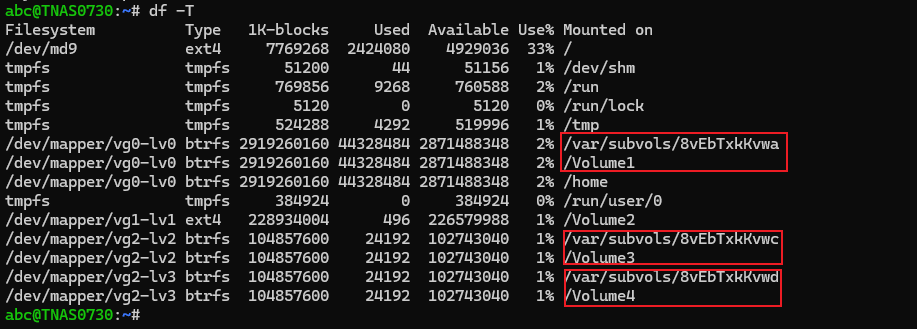
Additionally, in the btrfs file system, when executing commands such as "umount /var/subvols/8vEbTxkKvwa" for subvolumes corresponding to non-first volumes, the command must also be adjusted. For instance, change it to "umount /var/subvols/8vEbTxkKvw?", where the "?" should be replaced with the corresponding subvolume name. All such names can be confirmed using the "df -T" command. As shown in the figure below:
If the prompt "Target is busy", Please cancel the occupancy of the volume by the service processes, disable the SSD cache (if no SSD cache, please ignore it), and then execute the command above again.
TOS 4.1.x & TOS 4.2.x:
TOS 5.x / TO 6.x:
4. Adjust the file system size
You need to know the file system of your volume first (btrfs/ext4):
Select commands to execute based on the type of file system you have learned previously:
btrfs
You should see the storage value slowly increase. After a few ten seconds, the process will be finished.
ext4
You should see the storage value slowly increase. After a few ten seconds, the process will be finished. Then execure the conmmand to mount:
Applicable model:All TNAS
Applicable version:TOS 4.1.x & TOS 4.2.x & TOS 5.x & TOS 6.x
Follow the instructions to resolve this issue:
1. login in ssh. How to log in to the SSH terminal?
2. If you have created a Hyper Cache for the volume, delete the Hyper Cache before performing the next step.
3. Modifying Storage Settings
The following example is based on Storage Pool1,Volume1(md0, vg0, lv0)
Your "Storage Pool, Volume" may be different.
Please use the following instructions to confirm:
Code: Select all
[root@TNAS-???? ~]# lsblkTOS 4.1.x & TOS 4.2.x:
Code: Select all
[root@TNAS-???? ~]#cd /
[root@TNAS-???? ~]# mdadm --grow /dev/md0 --size=max
[root@TNAS-???? ~]# umount /mnt/md0
[root@TNAS-???? ~]# umount /home
[root@TNAS-???? ~]# vgchange -an vg0
[root@TNAS-???? ~]# pvresize /dev/md0
[root@TNAS-???? ~]# vgchange -ay vg0
[root@TNAS-???? ~]# lvextend -l +100%FREE /dev/vg0/lv0Code: Select all
[root@TNAS-???? ~]#cd /
[root@TNAS-???? ~]# mdadm --grow /dev/md0 --size=max
[root@TNAS-???? ~]# umount /Volume1
[root@TNAS-???? ~]# umount /home
[root@TNAS-???? ~]# vgchange -an vg0
[root@TNAS-???? ~]# pvresize /dev/md0
[root@TNAS-???? ~]# vgchange -ay vg0
[root@TNAS-???? ~]# lvextend -l +100%FREE /dev/vg0/lv0Code: Select all
[test@TNAS-???? ~]# cd /
[test@TNAS-???? /]# mdadm --grow /dev/md0 --size=max
[test@TNAS-???? /]# umount /Volume1
[test@TNAS-???? /]# umount /home
[test@TNAS-???? /]# vgchange -an vg0
[test@TNAS-???? /]# pvresize /dev/md0
[test@TNAS-???? /]# vgchange -ay vg0
[test@TNAS-???? /]# lvextend -l +100%FREE /dev/vg0/lv0
Code: Select all
[test@TNAS-???? ~]# cd /
[test@TNAS-???? /]# mdadm --grow /dev/md0 --size=max
[test@TNAS-???? /]# umount /Volume1
[test@TNAS-???? /]# umount /var/subvols/8vEbTxkKvwa
[test@TNAS-???? /]# umount /home
[test@TNAS-???? /]# vgchange -an vg0
[test@TNAS-???? /]# pvresize /dev/md0
[test@TNAS-???? /]# vgchange -ay vg0
[test@TNAS-???? /]# lvextend -l +100%FREE /dev/vg0/lv0
Additionally, in the btrfs file system, when executing commands such as "umount /var/subvols/8vEbTxkKvwa" for subvolumes corresponding to non-first volumes, the command must also be adjusted. For instance, change it to "umount /var/subvols/8vEbTxkKvw?", where the "?" should be replaced with the corresponding subvolume name. All such names can be confirmed using the "df -T" command. As shown in the figure below:
If the prompt "Target is busy", Please cancel the occupancy of the volume by the service processes, disable the SSD cache (if no SSD cache, please ignore it), and then execute the command above again.
TOS 4.1.x & TOS 4.2.x:
Code: Select all
[root@TNAS-???? ~]#  cd /
[root@TNAS-???? /]# fuser -mk /mnt/md0
Code: Select all
[test@TNAS-???? ~]#  cd /
[test@TNAS-???? /]# fuser -mk /Volume1
4. Adjust the file system size
You need to know the file system of your volume first (btrfs/ext4):
Code: Select all
[root@TNAS-???? ~]# blkid /dev/vg0/lv0btrfs
Code: Select all
[root@TNAS-???? ~]# /etc/tos/script/mntdata
[root@TNAS-???? ~]# btrfs filesystem resize max /mnt/md0ext4
Code: Select all
[root@TNAS-???? ~]# e2fsck -f /dev/vg0/lv0 -y
[root@TNAS-???? ~]# resize2fs /dev/mapper/vg0-lv0Code: Select all
[root@TNAS-???? ~]# /etc/tos/script/mntdata