Page 1 of 1
SSD CACHE SSD COMPATIBILITY
Posted: 08 Jul 2021, 14:27
by betuning
Hello,
I am trying to activate the ssd cache, it does not work with my crucial BX500 so could you tell me if the samsung 870 evo is compatible or other because the list on the site resumes from standby reference.
Re: SSD CACHE SSD COMPATIBILITY
Posted: 08 Jul 2021, 16:08
by TMSupport
Please advise your TNAS model number and current TOS version.
Could you get to this page to enable SSD cache?
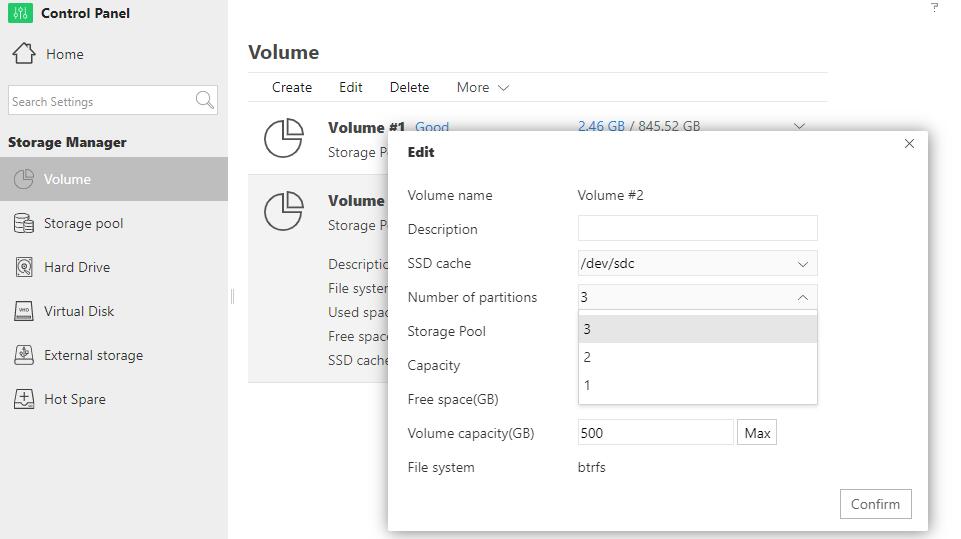
Re: SSD CACHE SSD COMPATIBILITY
Posted: 08 Jul 2021, 16:41
by betuning
F5-221
TOS 4.2.14
I put the ssd hide the nas restart but it is still disabled so I think of an incompatibility with my ssd "CT480BX500SSD1"
Re: SSD CACHE SSD COMPATIBILITY
Posted: 08 Jul 2021, 17:35
by TMSupport
Could you please take a screenshot of the detailed information of your Storage pool ?
Re: SSD CACHE SSD COMPATIBILITY
Posted: 08 Jul 2021, 17:40
by betuning
Re: SSD CACHE SSD COMPATIBILITY
Posted: 08 Jul 2021, 17:56
by TMSupport
Did the TNAS reboot automatically after enabling SSD cache and clicking Confirm? It would be rebooted automatically if the SSD is enabled successfully.
Re: SSD CACHE SSD COMPATIBILITY
Posted: 08 Jul 2021, 18:05
by betuning
TMSupport wrote: ↑08 Jul 2021, 17:56
Did the TNAS reboot automatically after enabling SSD cache and clicking Confirm? It would be rebooted automatically if the SSD is enabled successfully.
I have already several times and after restarting the ssd cache always deactivate
Re: SSD CACHE SSD COMPATIBILITY
Posted: 08 Jul 2021, 18:11
by TMSupport
Is it ok to let the engineer to check it? To see whether it's the compatible issue or the firmware. Please contact support(at)terra-master.com to confirm it.
Re: SSD CACHE SSD COMPATIBILITY
Posted: 12 Jul 2021, 23:16
by canadianviking
Stop any applications you have running on the NAS before you try and enable the SSD cache.