Page 1 of 1
Volume filling up
Posted: 24 Jun 2021, 04:33
by alxgldn
Hello, I have had my TNAS for awhile but recently am not able to download any apps because the main volume that everything boots off of (Volume 1) is showing up as filled. It is a bit weird as it shows only 496GB used but that drive is 1TB? I have also included another screenshot where it shows that I have still about half empty. I don't know why it is showing me full at one point and then half full at another? I am trying to download apps and they are stuck at 0% my assumption being that TNAS thinks the boot installation drive is filled. I have ran a bad block scan, SSD Trim, and file system defragmentation. Nothing changed it. I have also obviously rebooted and checked for updates nothing solved it. Don't use recycle bin it is empty.
Please if I could get this solved asap that would be wonderful.
TOS version 4.2.09-2101251735
Re: Volume filling up
Posted: 24 Jun 2021, 11:02
by TMSupport
Please ensure that this HDD4 of volume 1 is really healthy. Please refer to this link to check it
viewtopic.php?f=75&t=1125
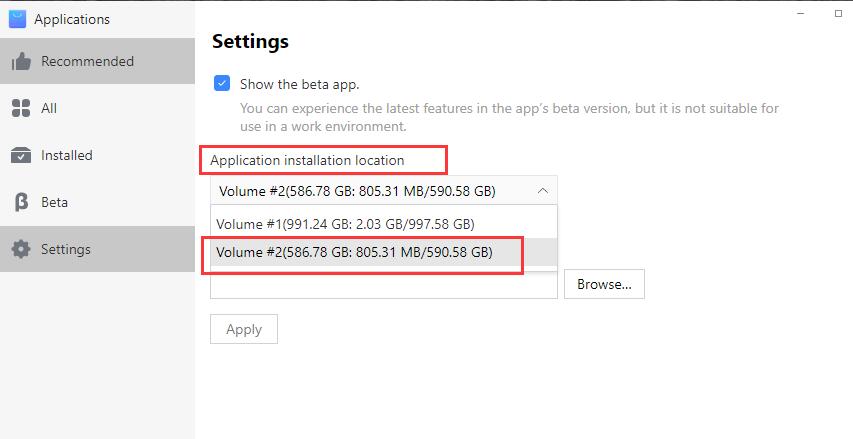
Also the applications could be installed on your volume 2 by change the settings in Application center.
Re: Volume filling up
Posted: 10 Jul 2021, 00:12
by snapperheadjoeTM
I am also seeing this behaviour but it is occuring because the recycle bin doesn't seem to be deleting files. I have retention set between 10 and 30 days on respective shares and I see files in the recycle bin of all my shares that are far older than the retention limit. For example the backups share (containing all PC and server backups) has a retention of 30 days however I see files that are 90 days old in these recycle bin folders.
I can manually delete the files which clears up space on the volume but the whole point is to have the NAS manage that automatically. I created a Powershell script to run daily and delete files 30 days an older from Backups\#Recycle but this creates other problems as the script seems to break permissions on some of the folders and they become orphaned. I have to Putty into the TNAS and manually delete folders or use the management console to do it. It is very frustrating. Is there a service that controls this retention or something I can fix to get this to work?
Re: Volume filling up
Posted: 12 Jul 2021, 14:02
by TMSupport
Thanks for the report. The issue of Recycle bin will be fixed in the new release of TOS.
Re: Volume filling up
Posted: 12 Jul 2021, 19:53
by snapperheadjoeTM
When is the new version coming out?
Re: Volume filling up
Posted: 13 Jul 2021, 11:17
by TMSupport
The end of July or in August.
Re: Volume filling up
Posted: 13 Jul 2021, 15:46
by V8Triker
What is also odd, to me, is that if you remove the recycle bin from the configuration it remains on the disk.
I guess this is by design, but would it not be better that if you de-configure the recycle bin the directory is removed?
Re: Volume filling up
Posted: 13 Jul 2021, 16:41
by TMSupport
We have verified this reported issue, the disabled recycle bin would still be shown when SMB access TNAS. The issue has been transferred to the tech teams and will be fixed in next release.
Re: Volume filling up
Posted: 13 Jul 2021, 16:50
by V8Triker
Many thanks for the reply.
Just to complete the thread, with a workaround for the issue I had.
I had run out of space due to the recycle bin being filled up.
I deleted the recycle bin, thinking this would be a quick method to free the space up again. As mentioned, the recycle bin remained.
It was possible to access the recycle bin with SMB access, but this can be VERY slow to deleted hundreds of thousands of files.
The quick solution is the following:
- Re-configure the recycle bin
- Use the TNAS File manager to delete the folders in the recycle bin
- De-configure the recycle bin
- Use an SMB connection to delete the recycle bin