Instructions for Online RAID Migration
Posted: 04 Feb 2021, 15:55
Applicable model: all TNAS models.
This guide will help you to migrate your current RAID to a high level online without formatting your drives or losing data.
Online migrations without losing data in the existing storage pool:
Single drive to RAID 1;
RAID 1 to RAID 5;
RAID 5 to RAID 6;
The capacity of the added HDD should be no less than the capacity of the minimum HDD in the storage pool.
Steps for Migration from Single to RAID1:
1. Boot your TNAS up and log into TOS webpage.
2. Insert the new HDD and go to TOS Control panel - Storage manager- Storage pool- click Edit, and select "Online RAID level Migration" from the list, check the added HDD and follow the wizard to complete.
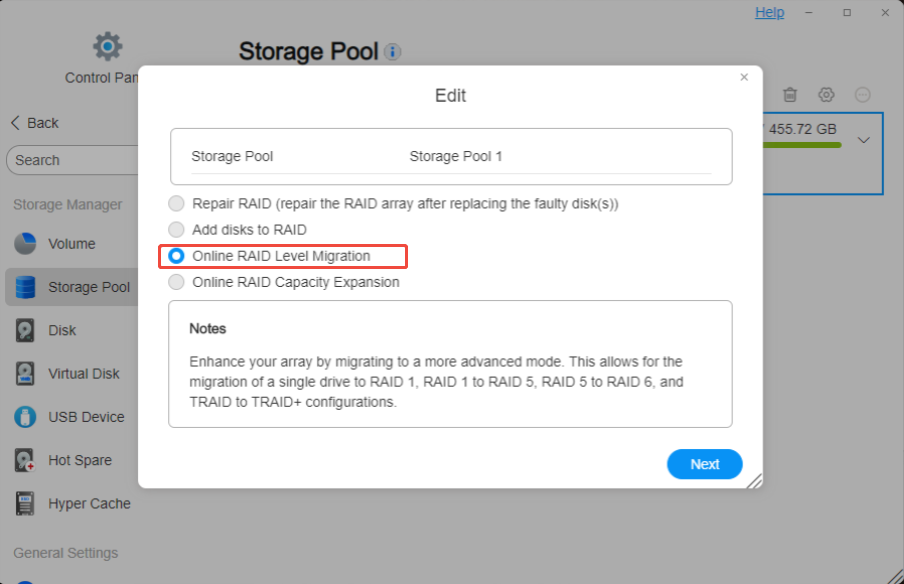
3. The RAID mode of the storage pool would be RAID1 after RAID rebuilding is finished. The total capacity would not be expanded since the hard drives are mirrored in RAID1.
Steps for Migration from RAID1 to RAID5:
1. Boot your TNAS up and log into TOS webpage.
2. Insert the new HDD and go to TOS Control panel - Storage manager- Storage pool- click Edit, and select "Online RAID level Migration" from the list, check the added HDD and follow the wizard to complete.
3.The RAID mode would be RAID5 after RAID rebuilding is finished. The total capacity of the storage pool would be expanded.
4. Please go to TOS Control panel - Volume - Edit to add the capacity for your volume.
The number at Free capacity is the capacity you can add for your existing volume.
The number at Volume capacity is the capacity of your existing volume, the capacity of your volume could only be added but not decreased.
Steps for Migration from RAID5 to RAID6:
1. Boot your TNAS up and log into TOS webpage.
2. Insert the new HDD and go to TOS Control panel - Storage manager- Storage pool- click Edit, and select "Online RAID level Migration" from the list, check the added HDD and follow the wizard to complete.
3.The RAID mode would be RAID6 after RAID rebuilding is finished. The total capacity would not be expanded since RAID6 allows 2 HDDs failure.
Note:
The sequence of RAID Migration should be Single to RAID1, RAID1 to RAID5, RAID5 to RAID6.
You cannot migrate to RAID10 from other RAID mode, please choose RAID10 during creation of RAID.
This guide will help you to migrate your current RAID to a high level online without formatting your drives or losing data.
Online migrations without losing data in the existing storage pool:
Single drive to RAID 1;
RAID 1 to RAID 5;
RAID 5 to RAID 6;
The capacity of the added HDD should be no less than the capacity of the minimum HDD in the storage pool.
Steps for Migration from Single to RAID1:
1. Boot your TNAS up and log into TOS webpage.
2. Insert the new HDD and go to TOS Control panel - Storage manager- Storage pool- click Edit, and select "Online RAID level Migration" from the list, check the added HDD and follow the wizard to complete.
3. The RAID mode of the storage pool would be RAID1 after RAID rebuilding is finished. The total capacity would not be expanded since the hard drives are mirrored in RAID1.
Steps for Migration from RAID1 to RAID5:
1. Boot your TNAS up and log into TOS webpage.
2. Insert the new HDD and go to TOS Control panel - Storage manager- Storage pool- click Edit, and select "Online RAID level Migration" from the list, check the added HDD and follow the wizard to complete.
3.The RAID mode would be RAID5 after RAID rebuilding is finished. The total capacity of the storage pool would be expanded.
4. Please go to TOS Control panel - Volume - Edit to add the capacity for your volume.
The number at Free capacity is the capacity you can add for your existing volume.
The number at Volume capacity is the capacity of your existing volume, the capacity of your volume could only be added but not decreased.
Steps for Migration from RAID5 to RAID6:
1. Boot your TNAS up and log into TOS webpage.
2. Insert the new HDD and go to TOS Control panel - Storage manager- Storage pool- click Edit, and select "Online RAID level Migration" from the list, check the added HDD and follow the wizard to complete.
3.The RAID mode would be RAID6 after RAID rebuilding is finished. The total capacity would not be expanded since RAID6 allows 2 HDDs failure.
Note:
The sequence of RAID Migration should be Single to RAID1, RAID1 to RAID5, RAID5 to RAID6.
You cannot migrate to RAID10 from other RAID mode, please choose RAID10 during creation of RAID.