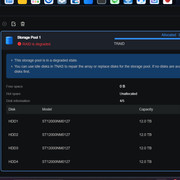
Thank you for providing the complete system report and for clearly describing the hard drive replacement and RAID rebuilding process.
We have carefully reviewed the RAID arrays, disk partitions, LVM configuration, file system, and SMART information for all four hard drives in the report. Based on our findings, we have identified the likely cause of the issue.
According to the system report, the file system (Btrfs, volume name: TOS_VOL_20240908) is currently mounted and accessible for both reading and writing. We also found no obvious Btrfs read errors, checksum errors, or I/O errors in the logs from the current boot session. In addition, all four hard drives have passed their SMART tests (PASSED), with zero reallocated sectors, pending sectors, and CRC errors.
However, although the md0 array has been successfully rebuilt, the logical volume lv0 associated with the storage pool is actually composed of two separate components: md0 and md1.
Currently, md1 is missing one member disk, preventing it from restoring full RAID redundancy. Therefore, even though md0 has been successfully rebuilt, part of the overall storage volume still lacks redundancy. This is why TOS continues to report the storage volume as "Damaged."
Root Cause: The Replacement Hard Drive Has Insufficient Capacity
The key issue in this case is that the replacement hard drive has a smaller actual capacity than the original drive.
Your earlier observation that "the rebuilding process did not restore the md1 member" was correct. After further investigation, we found that the underlying cause is an actual capacity difference between the original and replacement hard drives.
Although all four drives have the same model number, ST12000NM0127, there are actually two different capacity versions:
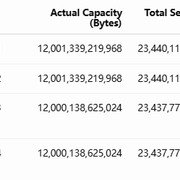
As shown in the table, HDD1 and HDD2 have a larger actual capacity than HDD3 and HDD4, with the following differences:
Sector difference: 2,344,912 sectors
Capacity difference: approximately 1.118 GiB
The space required for the md1 member partition on each drive is exactly 2,344,912 sectors.
This means that the replacement HDD4 does not have sufficient capacity to accommodate the 5th partition that existed on the original HDD4.
Due to the insufficient disk capacity, the system cannot create /dev/sdb5 on the replacement drive. Consequently, it cannot add this partition back to the md1 array.
Therefore, this is not an issue with the RAID rebuilding process itself. Rather, the replacement hard drive does not have sufficient actual capacity, preventing md1 from restoring its complete member configuration.
Even when the replacement drive has the same model number as the original drive, its actual capacity may differ. When replacing a hard drive, it is therefore important to verify the actual sector count rather than relying solely on the model number.
Recommended Solutions
We would like to offer two possible solutions:
Solution A: Replace the Drive with One That Has Sufficient Actual Capacity
The replacement hard drive must meet the following capacity requirements:
The value returned by the blockdev --getsz command must be no less than 23,440,115,664 sectors, corresponding to an actual capacity of at least 12,001,339,219,968 bytes.
We recommend choosing a hard drive whose actual capacity has been verified to meet this requirement. This could be a qualifying 12 TB drive version or a 14 TB / 16 TB drive.
Once you have confirmed that the replacement drive meets the capacity requirement, follow these steps:
1.Shut down the NAS.
2.Remove HDD4 and insert the new replacement drive.
3.Power on the NAS.
4.Navigate to the Storage Pool page in TOS and click Repair.
TOS should then automatically initiate the RAID repair process.
Solution B: Back Up Your Data and Recreate the Storage Pool
If you do not wish to replace the hard drive for the time being, you can also choose this option.
The steps are as follows:
1.Back up all data from the existing volume to another storage device.
2.Delete the current storage pool and create a new storage pool using the existing four hard drives.
3.Restore your data from the backup to the newly created storage pool.
Please note that this process will reinitialize the storage pool and erase all data in the existing storage pool. Therefore, you must ensure that a complete data backup has been successfully completed before proceeding.
Additionally, since two of the existing hard drives have smaller capacities, the available capacity of the newly created storage pool will also be limited by the smaller drives. We estimate that the new storage pool will have approximately 2.2 GiB less capacity than the current one.