[Help] [TOS 6 / BTRFS] Volume 1 not reclaiming disk space after deleting files, snapshots and SABnzbd
Posted: 11 Oct 2026, 08:40
# [TOS 6 / BTRFS] Volume 1 not reclaiming disk space after deleting files – Even after removing all snapshots and SABnzbd
Hello everyone,
I'm experiencing a persistent and frustrating storage issue with my **TerraMaster F6-424 Max running TOS 6**.
My NAS has **two storage volumes**, but only Volume 1 is affected.
## The problem
**Volume 1 (BTRFS) does not reclaim disk space when files are deleted.**
Whenever I copy, transfer or download files onto Volume 1, the reported used storage increases normally.
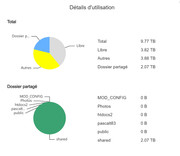
However, when I delete those files, the available storage space does not increase accordingly.
Over time, Volume 1 keeps filling up, even though I regularly delete large amounts of data.
**Important clarification: This issue is NOT limited to SABnzbd or its download directory.**
I initially noticed the problem with files downloaded through SABnzbd4, but I have also observed exactly the same behavior in **regular shared folders accessed directly from my Windows PC over the network**.
In other words:
- Files copied from my PC to shared folders on Volume 1 increase the reported disk usage.
- When those same files are deleted, the storage space is not recovered.
- The issue occurs in multiple locations on Volume 1, not just the SABnzbd download directory.
- **Volume 2 works normally:** copying files increases used space, and deleting them releases it as expected.
This strongly suggests a problem related to Volume 1, BTRFS, or TOS storage management rather than SABnzbd alone.
## Everything I have already tried
### 1. Checked the recycle bin
I checked the `user` shared folder and could not find a `#recycle` directory.
I have not yet confirmed the recycle bin configuration of every shared folder.
### 2. Investigated BTRFS snapshots
Volume 1 had automatic snapshots enabled.
- One snapshot was created per day.
- Approximately 11–50 snapshots were present.
- I suspected they were retaining deleted data.
### 3. Deleted all snapshots
I manually deleted **ALL snapshots visible in the Snapshot application** before uninstalling it.
I then completely uninstalled the Snapshot application.
**Result: No noticeable storage space was recovered.**
### 4. Completely removed SABnzbd4
SABnzbd4 was installed through the TOS Application Center.
Its completed download directory was:
`user/mod_config/sabnzbd4/download/complete`
I performed the following operations:
- Uninstalled SABnzbd4.
- Deleted the downloaded files.
- Removed the remaining SABnzbd configuration files and directories.
**Result: Still no storage space recovered.**
Since the same behavior also occurs in normal shared folders accessed from Windows, I no longer believe SABnzbd is the main cause.
## Current situation
- Volume 1 uses BTRFS.
- Volume 1 continues to show high storage usage despite extensive file deletions.
- All snapshots visible in the Snapshot application have been deleted.
- The Snapshot application has been uninstalled.
- SABnzbd4 and its remaining files have been removed.
- The problem affects both application folders and regular network shared folders.
- Volume 2 continues to reclaim space normally.
I have not formatted the volume, rebuilt the RAID, or run destructive BTRFS repair commands.
## Questions for TerraMaster support and the community
1. **Is this a known issue with BTRFS or TOS 6 where deleted files do not release storage space?**
2. Could there still be hidden snapshots, BTRFS subvolumes, or retained data even after deleting every snapshot visible in the application?
3. Could the BTRFS filesystem be reporting incorrect storage usage, or could some allocated space be incorrectly accounted for?
4. Is there a safe way to identify precisely what is consuming the storage space on Volume 1?
5. Would read-only commands such as `btrfs filesystem usage`, `btrfs subvolume list`, or `df -hT` help identify the cause?
6. Does TerraMaster provide an official diagnostic or a non-destructive procedure to reclaim storage space in this situation?
7. Has anyone experienced the same behavior specifically on a TerraMaster NAS running TOS 6?
## What I need
My priority is to **recover the disk space occupied by deleted files without losing any of my remaining data**.
I would also like to understand why this issue affects Volume 1 but not Volume 2, and how to prevent it from happening again.
I'm happy to provide screenshots, system information or command outputs if required.
I would particularly appreciate guidance from TerraMaster technical support or users familiar with BTRFS internals.
Thank you in advance for your help!
Hello everyone,
I'm experiencing a persistent and frustrating storage issue with my **TerraMaster F6-424 Max running TOS 6**.
My NAS has **two storage volumes**, but only Volume 1 is affected.
## The problem
**Volume 1 (BTRFS) does not reclaim disk space when files are deleted.**
Whenever I copy, transfer or download files onto Volume 1, the reported used storage increases normally.
However, when I delete those files, the available storage space does not increase accordingly.
Over time, Volume 1 keeps filling up, even though I regularly delete large amounts of data.
**Important clarification: This issue is NOT limited to SABnzbd or its download directory.**
I initially noticed the problem with files downloaded through SABnzbd4, but I have also observed exactly the same behavior in **regular shared folders accessed directly from my Windows PC over the network**.
In other words:
- Files copied from my PC to shared folders on Volume 1 increase the reported disk usage.
- When those same files are deleted, the storage space is not recovered.
- The issue occurs in multiple locations on Volume 1, not just the SABnzbd download directory.
- **Volume 2 works normally:** copying files increases used space, and deleting them releases it as expected.
This strongly suggests a problem related to Volume 1, BTRFS, or TOS storage management rather than SABnzbd alone.
## Everything I have already tried
### 1. Checked the recycle bin
I checked the `user` shared folder and could not find a `#recycle` directory.
I have not yet confirmed the recycle bin configuration of every shared folder.
### 2. Investigated BTRFS snapshots
Volume 1 had automatic snapshots enabled.
- One snapshot was created per day.
- Approximately 11–50 snapshots were present.
- I suspected they were retaining deleted data.
### 3. Deleted all snapshots
I manually deleted **ALL snapshots visible in the Snapshot application** before uninstalling it.
I then completely uninstalled the Snapshot application.
**Result: No noticeable storage space was recovered.**
### 4. Completely removed SABnzbd4
SABnzbd4 was installed through the TOS Application Center.
Its completed download directory was:
`user/mod_config/sabnzbd4/download/complete`
I performed the following operations:
- Uninstalled SABnzbd4.
- Deleted the downloaded files.
- Removed the remaining SABnzbd configuration files and directories.
**Result: Still no storage space recovered.**
Since the same behavior also occurs in normal shared folders accessed from Windows, I no longer believe SABnzbd is the main cause.
## Current situation
- Volume 1 uses BTRFS.
- Volume 1 continues to show high storage usage despite extensive file deletions.
- All snapshots visible in the Snapshot application have been deleted.
- The Snapshot application has been uninstalled.
- SABnzbd4 and its remaining files have been removed.
- The problem affects both application folders and regular network shared folders.
- Volume 2 continues to reclaim space normally.
I have not formatted the volume, rebuilt the RAID, or run destructive BTRFS repair commands.
## Questions for TerraMaster support and the community
1. **Is this a known issue with BTRFS or TOS 6 where deleted files do not release storage space?**
2. Could there still be hidden snapshots, BTRFS subvolumes, or retained data even after deleting every snapshot visible in the application?
3. Could the BTRFS filesystem be reporting incorrect storage usage, or could some allocated space be incorrectly accounted for?
4. Is there a safe way to identify precisely what is consuming the storage space on Volume 1?
5. Would read-only commands such as `btrfs filesystem usage`, `btrfs subvolume list`, or `df -hT` help identify the cause?
6. Does TerraMaster provide an official diagnostic or a non-destructive procedure to reclaim storage space in this situation?
7. Has anyone experienced the same behavior specifically on a TerraMaster NAS running TOS 6?
## What I need
My priority is to **recover the disk space occupied by deleted files without losing any of my remaining data**.
I would also like to understand why this issue affects Volume 1 but not Volume 2, and how to prevent it from happening again.
I'm happy to provide screenshots, system information or command outputs if required.
I would particularly appreciate guidance from TerraMaster technical support or users familiar with BTRFS internals.
Thank you in advance for your help!