Page 1 of 1

[Help] Stopped fans

Posted: 01 Oct 2026, 18:42
by MapaM
Good morning.

I have a D4-300 unit connected to an F6-424 running TOS7. When the drives enter sleep mode, the D4's fans stop, yet the device continues to generate heat; I read in another post on this forum that this is normal. However, that post states the following:
"3. The D4-320 is equipped with a smart, temperature-controlled fan, and its rotation speed is managed via multiple temperature monitoring points within the device."
My hard drives are at 56°C (according to the "Disk Health Guardian" app), the casing is quite hot, and the fans are stopped.
Is there a way to configure the fans to run continuously?

Thanks.
Re: [Help] Stopped fans

Posted: 01 Oct 2026, 22:03
by TMnight
When you mentioned that the “hard drives enter sleep mode,” could you please clarify whether you are referring to the drives installed in the NAS or the drives installed in the D4-300?

We recommend that you first try disabling the scheduled disk hibernation feature on the NAS, and then observe whether the issue still occurs. This will help us determine whether the issue is related to the hard drive sleep mechanism.

Re: [Help] Stopped fans

Posted: 02 Oct 2026, 02:13
by MapaM
Sorry, I didn't explain myself clearly.

My D4-300 unit is connected to the F6-424 via the USB-C port, and the drives inside are configured as a storage pool with a volume.

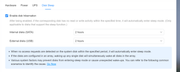
What I meant was that the D4-300's fans stop when its hard drives enter hibernation mode, as configured in TOS-7.0.1278 (see attached image). The F6-424's fans are working perfectly; I am referring only to the D4-300 unit. My question is: is there any way to keep the fans running even when the drives go into hibernation? Even though the hard drives are spun down, heat is still generated but not dissipated.

Thank you very much.

Image

Re: [Help] Stopped fans

Posted: 02 Oct 2026, 10:24
by EriChan
MapaM wrote: ↑02 Oct 2026, 02:13
In the earlier D4-300 hardware design, power to the hard drives is not cut off during hibernation—the drives remain energized, which causes them to continue generating heat while the fans are stopped. (In contrast, the newer D4-320 features an updated hardware design that cuts power to the drives during sleep to prevent heat generation.)

To avoid heat buildup on the D4-300, we recommend disabling the corresponding hibernation feature in Control Panel > Hardware & Power > Hard Drive Sleep on your NAS so that the fans stay running continuously for active cooling.

Thank you for your understanding and support!