TNAS Mobile - Main Button
Posted: 20 Sep 2026, 18:07
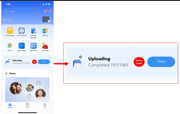
Hi Team... I think this section (see in red) could be better... it only allows to (a) STOP the process, and (b) access the upload list...
Some suggestions to add value:
- add "PAUSE" pretty sure, someone needs to pause the process instead of stopping it and restart everything.
- add "settings" to control upload settings only (no "TM photos" settings)
- in settings add the option to define priorities... ie. camera first (then reddit, tiktok, or IG ie)
- in settings, add option to define priority (old or new ie)
- with the number of images, and last uploads....you can estimate the uploading time
- you can also estimate the upload size (so we can know we will upload 80gb and I can have a coffee)
- add last upload "x hours/days ago"
Some suggestions to add value:
- add "PAUSE" pretty sure, someone needs to pause the process instead of stopping it and restart everything.
- add "settings" to control upload settings only (no "TM photos" settings)
- in settings add the option to define priorities... ie. camera first (then reddit, tiktok, or IG ie)
- in settings, add option to define priority (old or new ie)
- with the number of images, and last uploads....you can estimate the uploading time
- you can also estimate the upload size (so we can know we will upload 80gb and I can have a coffee)
- add last upload "x hours/days ago"