Page 1 of 2
[Help] TFM Backup on TOS7.x fails
Posted: 18 Sep 2026, 00:24
by tnaspain
I am using the latest TOS 7.x and TFM 1. 0.155.
Backups of shared folder will not complete. They almost complete. But then I get these errors:
Problem #1: A shared folder is set up for incremental backup. But leaves out one or two files, and shows "Backup Failed!"
On every shared folder, without exception.
Problem #2: Log file shows it tries to copy the snapshot folder. Says something about not understanding the @ symbol.
Yet, when the backups are configured, there is no way to exclude a folder. One can only exclude file types ( e.g. .pdf). How do I exclude the entire snapshot folder?
It should not be trying to backup a snapshot folder, as that is like trying to do a backup of a backup. Expecting it to be smarter than that.
Problem #3: Why is there a separate log entry for each file copied. If I have 100,000 files (I actually have more), I get 100,000 logs. Logs should be consolidated into sessions.
Can anyone please help? Thanks!
Re: [Help] TFM Backup on TOS7.x fails
Posted: 18 Sep 2026, 09:50
by CursaYang
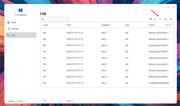
Do the files that fail to back up share any common file type or file name? Or is it random? TFM is designed to back up entire shared folders and does not support excluding a specific folder within them; you can choose other backup software instead. The backup log records details down to each individual file in order to confirm whether the backup succeeds. You can export the log and send it to [support(at)terra-master.com] for analysis. You can use the following commands in the terminal to copy the log files to the public folder on Volume 1:
Code: Select all
cp -r /var/log/TFM.log /Volume1/public/
Code: Select all
cp -r /var/log/syslog /Volume1/public/
Re: [Help] TFM Backup on TOS7.x fails
Posted: 18 Sep 2026, 10:49
by tnaspain
Thanks for the reply. From the logs, it shows TFM Backup is attempting to access the @snapshot folder. Since TFM Backup does not understand the @snapshot symbol, it aborts.
It show that in the log, that it failed to copy 1 file. The error reads "....\"@snapshot" The file is a symbolic link and the symbolic link is not supported for backup.
It thinks the @snapshot directory is a file. It is not. So this is a bug.
Why would it even attempt to try to backup a @snapshot folder? It should be programmed to avoid this folder. There is no way that I can see for the user to exclude this folder from the incremental backup.
Is there a way to exclude a snapshot directory with some wildcard file type exclusion code? Trying to exclude it by typing in "@snnpshot" on the TFM Backup for that shared folder exclusion list, fails. so does trying to exclude @*.*
So I need more help please. Surely I am just missing something simple, because it surely can not be that hard to ask the program to NOT try to back up snapshots?
Re: [Help] TFM Backup on TOS7.x fails
Posted: 18 Sep 2026, 16:42
by Gremlin
When you create a TFM task, how are you doing this? It seems to me that when selecting a source, it does not permit the selection of folders at the Volume level, only shared folders and their sub-trees. Have you actually already copied your snapshot folder to another folder and are trying to backup those copies?
Maybe you could share a screen shot of the source selection screen as you see it.
Re: [Help] TFM Backup on TOS7.x fails
Posted: 18 Sep 2026, 23:31
by tnaspain
Gremlin, yes, I am referring to "shared folders" on the volume, not some root files on the volume. Let me clarify.
In TFM, one can only select an entire shared folder to backup, not individual sub-folders or files.
And each of my shared folders have a sub-folder inside called "@snapshot".
This is the snapshot folder (not a file like TFM likes to call it).
That snapshot folder is automatically created inside each shared folder, when snapshots of a shared folder are allowed (toggeled to ON). I did not create this folder, the system automatically did, and placed it in each respective shared folder.
In each of the shared folders, TFM Backup fails to backup one "file" as I mentioned in the prior post. That "file" is called "@snapshot".
I have TFM set to backup each shared folder on the volume.
TFM is trying to back up the @snapshot folder in each of the shared folders.
As such, each folders backup fails.
Exactly the same problem on each shared folder, with same error message. Backup Failed!
All other files back up OK.
Need to be able to somehow exclude the @snapshot folder from TFM handling.
Not possible, like you say. At least not in any way I can see. Is there a workaround?
Is this an ugly bug?
If it was a bug, everyone using TFM would have discovered it by now.
So it must be some sort of setting that I am missing.
Paging tech suppport please!
Re: [Help] TFM Backup on TOS7.x fails
Posted: 18 Sep 2026, 23:42
by tnaspain
Gremlin, yes, I am referring to "shared folders" on the volume, not some root files on the volume.
See attached screenshot.
In TFM, one can only select an entire shared folder to backup, not individual sub-folders or files.
And each of my shared folders have a sub-folder inside called "@snapshot".
This is the snapshot folder (not a file like TFM likes to call it).
Snapshot folder is automatically created inside each shared folder, when snapshots of a shared folder are allowed (toggeled to ON), and placed in each respective shared folder.
In each of the shared folders, TFM Backup fails to backup one "file" as I mentioned in the prior post.
That "file" is called "@snapshot".
I have TFM set to backup each shared folder on the volume.
TFM is trying to back up the @snapshot folder in each of the shared folders.
As such, each folders backup fails.
Big red error message on each Task: Backup Failed!
All other files back up OK on all shared folders.
Need to be able to somehow exclude the @snapshot folder from TFM handling.
Not possible, like you say. At least not in any way I can see. Is there a workaround?
Is this an ugly bug?
If it was a bug, everyone using TFM would have discovered it by now.
So it must be some sort of setting that I am missing.
Paging tech suppport please!

Re: [Help] TFM Backup on TOS7.x fails
Posted: 19 Sep 2026, 00:10
by Gremlin
I'm going to install The snapshot app and see what it does. I've never seen this as an issue before, but I have only used filesystem snapshots since mid Tos6.
Re: [Help] TFM Backup on TOS7.x fails
Posted: 19 Sep 2026, 00:46
by Gremlin
OK. I see exactly what you are talking about. The TFM does NOT fail, but it reports as 'partially successful' - which means you would have to troll through the log to see what failed.
HOWEVER - If, when you create/edit your snapshot, you opt NOT to make snapshots visible in File manager, the problem goes away.

I think the ability to exclude certain files/folders from TFM should be added to the task creation dialogue and not just depend on format [.pdf, .img, etc.] for those that have snapshot files visible (for example). I would not really want to have snapshot files backed up by TFM anyway, but it does need a more graceful mechanism. I can think of several occasions when I might want to skip folders in a backup. For example, I upload several log files from UPS via ftp, but they don't really need to be duplicated (nothing lost if deleted); likewise the results of file clean-up tasks stored in other folders could be excluded. Nice and simple if the folders can be excluded or, better I suppose, if the selection mechanism could be improved.
Re: [Help] TFM Backup on TOS7.x fails
Posted: 19 Sep 2026, 02:38
by tnaspain
Thanks for the words of wisdom. OK, I can make the snapshots Not visible in file manager.
But if I do that, will that not make it harder for me to find and recover if I need to extract a file from some snapshot? I need to be able to see that snapshot, so I can find it in the shared folder. That is the only way I can access the snapshot, that I can find.
Snapshots folder has another huge level of problems. Under snapshots app, under restore, it shows blank. None of my snapshots are there to restore from. This TOS7 is very buggy. And I am just starting with using it. I will post that in more detail on another thread.
Re: [Help] TFM Backup on TOS7.x fails
Posted: 19 Sep 2026, 11:02
by Phil
tnaspain wrote: ↑19 Sep 2026, 02:38
Thanks for the words of wisdom. OK, I can make the snapshots Not visible in file manager.
But if I do that, will that not make it harder for me to find and recover if I need to extract a file from some snapshot? I need to be able to see that snapshot, so I can find it in the shared folder. That is the only way I can access the snapshot, that I can find.
Snapshots folder has another huge level of problems. Under snapshots app, under restore, it shows blank. None of my snapshots are there to restore from. This TOS7 is very buggy. And I am just starting with using it. I will post that in more detail on another thread.
Thank you for your detailed feedback.
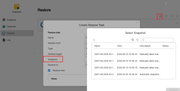
When you need to restore a snapshot: please click "Create" on the restore interface and select the snapshot restoration option; your previous snapshot tasks will appear, allowing you to choose the specific snapshot you need. Please refer to the image and try again.