Page 1 of 1
[Help] SSL certificates - TOS 7.0.1163 (x86)
Posted: 02 Sep 2026, 20:41
by Archivist
Hi,
I'm using the latest version of TOS 7 on my F2-425 Plus. According to the Control Panel GUI, I have successfully installed certificates and provisioned them for use with the Web Server and HTTPS. However, when using websites to diagnose SSL issues, It is reporting that the built in terra-master certificate is being used. HELP!
Re: [Help] SSL certificates - TOS 7.0.1163 (x86)
Posted: 03 Sep 2026, 11:12
by CursaYang
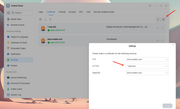
Do you mean that you selected a custom certificate in the settings, but the browser still indicates that the NAS's built-in certificate is being used? Could you please provide a screenshot of the prompt?
Re: [Help] SSL certificates - TOS 7.0.1163 (x86) [SOLVED]
Posted: 04 Sep 2026, 03:38
by Archivist
The answer is - reverse proxy. Since TOS uses port 443 for TNAS, that certificate must present. Other traffic needs to be identified by domain request and forwarded to the correct port for that domain certificate to present.
Re: [Help] SSL certificates - TOS 7.0.1163 (x86)
Posted: 17 Sep 2026, 01:46
by Bartman
Terramaster's ssl system does not work, it will always show as unsecured and you can not change it with their system, and you will not get any support from them to get it sorted, just search the forum, same results. Archivist is correct as TNAS SSL does not work out of the box.
Regards
Re: [Help] SSL certificates - TOS 7.0.1163 (x86)
Posted: 17 Sep 2026, 09:41
by CursaYang
When accessing your TNAS via a local IP address, the browser may display a “Not Secure” warning because the SSL/TLS certificate is issued for the tnas.online domain. When you access your TNAS remotely through `tnas.online`, the domain matches the certificate, so the browser can verify the connection normally.
Adapting certificates to local IP addresses is difficult because private IP addresses vary between networks, may change dynamically, and generally cannot be validated by public certificate authorities in the same way as public domain names. Therefore, this warning is expected when accessing the NAS directly through its local IP address and does not necessarily indicate a security vulnerability in the NAS.
Archivist uses a third-party custom certificate, which differs from your use case.
Re: [Help] SSL certificates - TOS 7.0.1163 (x86)
Posted: 26 Sep 2026, 11:01
by kovalchukfx
Hi!
The problem is that even if you install your own certificate, when loading TOS 7 it first opens 443 and then redirects to 5443. Your certificate will only apply to 5443 (or whichever port you specify), and when loading the WebGUI it will ALWAYS require the terra-master-com certificate. Even if you specify your own certificate in the FTP, HTTPS, WebDAV service settings, the Terra-master.com certificate will be required regardless of whether you need it on your local network or not! It cannot be installed on a computer or phone. It’s not for you! I still haven’t figured out why I need it.
Due to the fact that Terramaster has not finalized this basic functionality, you’ll have to fix it manually instead of them. Or accept it as is, or set up an external reverse proxy.
Let’s get started!
1. Make a backup of the original certificates. Note that via the GUI you cannot delete them, only download and update. Make a backup!
2. Add your self‑signed SSL certificate from Control Panel → Security → Certificates → Add (+).
3. Log in to the terminal as a superuser, or via SSH if it’s enabled.
4. Your uploaded SSL certificate is stored here: /etc/certificate/_archive/fullchain/server.pem and server.key. Do not change the names!
The folder /etc/certificate/_archive/terra-master/server.pem and server.key also exists there — this is the original terra-master.com certificate.
5. Edit the nginx configuration.
/etc/nginx/tnasonline.conf is pointless to edit — it magically resets to default after a reboot!
So edit nano or vi /etc/nginx/nginx.conf.
Replace the paths with your own:
ssl_certificate /etc/certificate/_archive/fullchain/server.pem;
ssl_certificate_key /etc/certificate/_archive/fullchain/server.key;
Save. Test nginx with nginx -t.
5. But even after this, not everything will work yet. )
5.1 You need to change the symlinks. Check and remember them for backup!
readlink /etc/nginx/server.crt
readlink /etc/nginx/server.key
5.2 Switch the symlinks to your certificate:
rm /etc/nginx/server.crt /etc/nginx/server.key
ln -s /etc/certificate/_archive/fullchain/server.pem /etc/nginx/server.crt
ln -s /etc/certificate/_archive/fullchain/server.key /etc/nginx/server.key
5.3 Check and reload:
nginx -t
nginx -s reload
6. Final check (on your own computer).
Make sure Nginx is actually serving your SSL:
openssl s_client -connect localhost:443 -showcerts </dev/null 2>/dev/null | openssl x509 -noout -subject -issuer -dates
6.1 If something went wrong, roll back!
rm /etc/nginx/server.crt /etc/nginx/server.key && \
ln -s ssl/server.crt /etc/nginx/server.crt && \
ln -s ssl/server.key /etc/nginx/server.key && \
nginx -t && nginx -s reload
As a result, the terra-master-com SSL will disappear from the GUI.
If you need it, I don’t know what you might use it for; you can restore it from the backup you made at the very beginning. You did make one, right?
Yes, this is a clumsy workaround — a real “dance with a tambourine” for something that should work out of the box, and it’s unknown how it will behave after a TOS 7 update. This issue is old and, unfortunately, hasn’t been resolved by the company!
If you don’t want to spend time on this, just set up Nginx Proxy Manager in a container and use it out of the box. But for those who don’t look for easy ways — here’s the solution!
I hope they fix it in future versions.
Good luck, regards!
Re: [Help] SSL certificates - TOS 7.0.1163 (x86)
Posted: 26 Sep 2026, 15:59
by MikeZhang
Thanks for taking the time to put together and share this detailed certificate replacement guide. The steps are thorough — backing up the original certs, uploading a self-signed one, editing nginx.conf, switching the symlinks, and verifying with openssl plus a rollback path. That's genuinely useful for other users hitting the same issue.