Page 1 of 2
OnlyOffice not opening files (bad gateway)
Posted: 27 Aug 2026, 17:12
by rvescovi
Hi,
I installed OnlyOffice 8.3.324 from TOS7.0 but every time I try to open a file I obtain a blank page, in the network in browser I discovered error retrieving file from DocumentServer, 502 bad gateway (seems not available).
Looking into logs I found that in @apps/OnlyOffice/log/docservice/out.log plenty of
[2026-08-27T11:07:13.068] [ERROR] [localhost] [docId] [userId] nodeJS - [AMQP] Error: connect ECONNREFUSED 127.0.0.1:5672
at TCPConnectWrap.afterConnect [as oncomplete] (node:net

16)
[2026-08-27T11:07:14.069] [ERROR] [localhost] [docId] [userId] nodeJS - [AMQP] Error: connect ECONNREFUSED 127.0.0.1:5672
at TCPConnectWrap.afterConnect [as oncomplete] (node:net
16)
[2026-08-27T11:07:15.071] [ERROR] [localhost] [docId] [userId] nodeJS - [AMQP] Error: connect ECONNREFUSED 127.0.0.1:5672
at TCPConnectWrap.afterConnect [as oncomplete] (node:net
16)
lsof -i :5672 is not showing any process listening on that port.
any idea?
Re: OnlyOffice not opening files (bad gateway)
Posted: 27 Aug 2026, 18:23
by CursaYang
What specific version of TOS 7 are you currently running?
You can try again after upgrading to TOS 7.0.1163:
viewtopic.php?t=10493&sid=e5594ddc8c3c3 ... b067e1b1d4
Re: OnlyOffice not opening files (bad gateway)
Posted: 27 Aug 2026, 22:43
by rvescovi
Ok, I wait NAS ask me for the update
Re: OnlyOffice not opening files (bad gateway)
Posted: 28 Aug 2026, 11:33
by CursaYang
This update adopts a phased gray release strategy to ensure stability across different device models and network environments.
Phase 1 (Starting Today): The manual update package is now available for download on our forum. It will be rolled out in batches based on system version, device model, and region.
Phase 2 (In One Week): The full online push will officially begin. At that time, all users will receive an update notification and can complete the update by following the on-screen prompts.
Re: OnlyOffice not opening files (bad gateway)
Posted: 07 Sep 2026, 16:58
by rvescovi
Hi, even with 1163 I have the same issue. Can this be related on some SPC missing rules?
Re: OnlyOffice not opening files (bad gateway)
Posted: 07 Sep 2026, 17:34
by CursaYang
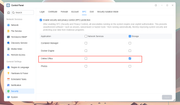
On the SPC settings page, please confirm whether network service permission has been granted to OnlyOffice. You can also export the complete logs and send them to our technical support email for analysis.
You can use the following command in the terminal to copy the log file to the public folder of volume 1:
Code: Select all
cp -r /Volume1/@apps/OnlyOffice/log/docservice/out.log /Volume1/public/
Re: OnlyOffice not opening files (bad gateway)
Posted: 07 Sep 2026, 23:43
by rvescovi
Hi, SPC network is enabled for OnlyOffice and the log is full of the line I added on top of the thread:
[AMQP] Error: connect ECONNREFUSED 127.0.0.1:5672
almost 120 mega in out.log with the same line.
Re: OnlyOffice not opening files (bad gateway)
Posted: 08 Sep 2026, 09:29
by CursaYang
You can temporarily disable SPC and then try opening the file again. Alternatively, you can use the link below to contact our online support team and schedule a remote troubleshooting session with an engineer:
https://salesiq.zohopublic.com/signatur ... 97d0be8892
Re: OnlyOffice not opening files (bad gateway)
Posted: 08 Sep 2026, 16:26
by rvescovi
Hi, I found the issue and again a missing configuration when SPC is enabled in /etc/spcack/accesses.d
Now I added a line with: "_ net-22d2 rwx" and OnlyOffice works.
This is the second missing configuration I found for SPC, last one was preventing UI to access the snapshots volume.
I suggest with your engineers to review SPC error logs in your test environments under /var/log/syslog.
Re: OnlyOffice not opening files (bad gateway)
Posted: 08 Sep 2026, 16:51
by rvescovi
I added also:
DockerEn-22d2 OnlyOffi-22d2 rwx
OnlyOffi-22d2 DockerEn-22d2 rwx
which speed up the file opening.
 16)
16)